Best AI CAD

The best AI CAD for 3D printing, compared on what makers need

By the GrandpaCAD team · · Updated

GrandpaCAD is our pick

13/14 #1 of 20

The AI CAD we'd use for 3D printing, and we think it's the easiest: a plain chat that still does advanced work.

Try GrandpaCAD free 3 free generations · downloads from $12

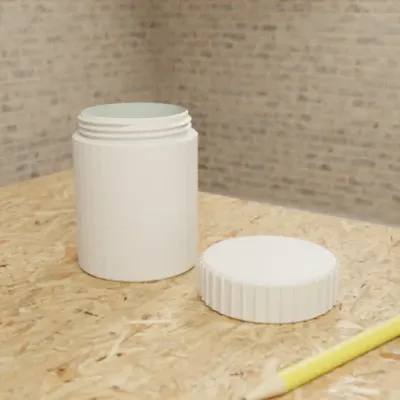
  • Screw-top container generated in GrandpaCAD, jar with its knurled lid beside it Opens its chat in GrandpaCAD.
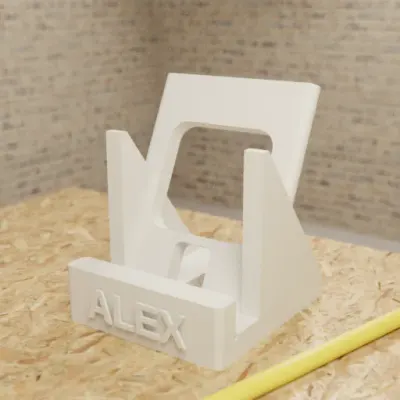
  • Phone stand generated in GrandpaCAD with the name ALEX engraved on the front Opens its chat in GrandpaCAD.
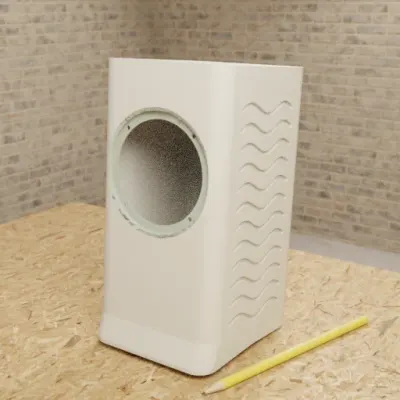
  • Vertical speaker tower enclosure generated in GrandpaCAD with the driver cutout at the top Opens its chat in GrandpaCAD.

Parts to your millimetres

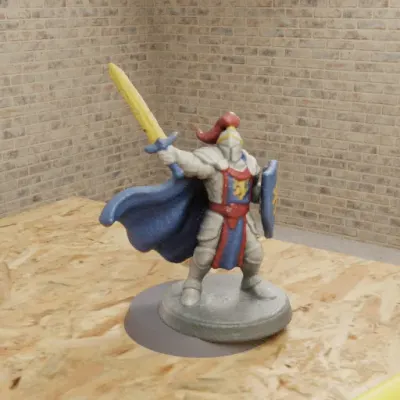
  • Fantasy warrior miniature with a raised sword and blue cape, generated in GrandpaCAD Opens its chat in GrandpaCAD.
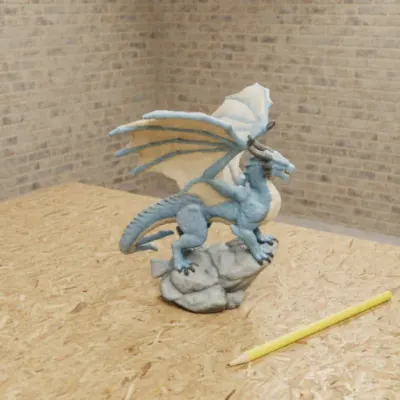
  • Sculpted spread-wing dragon on a grey rock, generated in GrandpaCAD Opens its chat in GrandpaCAD.
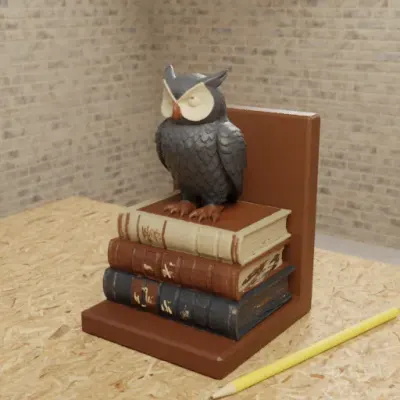
  • Sculpted owl on a stack of books as a bookend, generated in GrandpaCAD Opens its chat in GrandpaCAD.

Sculpted figures in colour

Made in GrandpaCAD: renders from public chats, checked . Each one opens its chat.

Top 4 of 20 on our 14-point score

  1. 1GrandpaCADour pick13 of 14
  2. 2BuildCAD AI11 of 14
  3. =3CADAM10 of 14
  4. =3Zoo Design Studiofor pro engineering10 of 14

We name two picks, our own tool and Zoo for professional engineering, and show every score so you can judge.

Facts checked , method v2. All 20 scores

As of November 2026 GrandpaCAD ranks first on our published criteria. It builds parts to the millimetres you type, with a slider per dimension, threads and fits, and sculpts multi-colour figurines; you get 3MF, STL or STEP, and it can slice them for your printer in the chat.

An AI CAD tool turns a description into a solid model with real dimensions; an AI 3D model generator sculpts a mesh that looks right but has no sizes to edit (for figurines, see AI 3D model generators for printing). We compared 20 tools of both kinds on eight things that matter once the file reaches your slicer, with a source and check date on every rival fact. We haven't printed the rivals' output yet. New to this? Start with how to use AI for 3D printing.

How this guide works

How we score every tool

The ranking

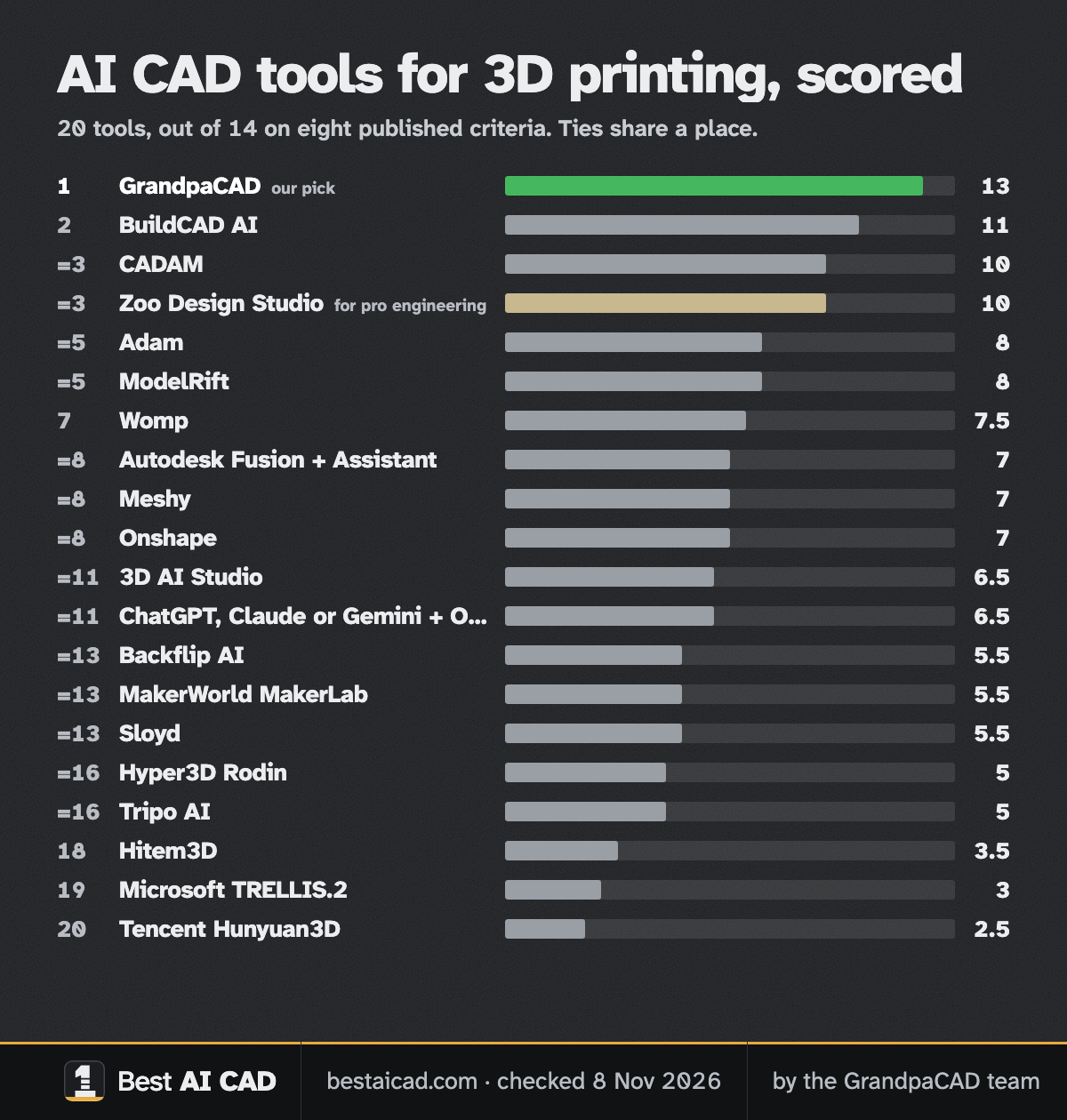
All 20 tools, scored Out of 14 on our published weights. Tied scores share a place. Names open each tool's facts and sources. Facts checked 8 Nov 2026.
Skip to our pick
  1. Rank 1: GrandpaCADour pick13 out of 14
  2. Rank 2: BuildCAD AI11 out of 14
  3. Rank 3, tied: CADAM10 out of 14
  4. Rank 3, tied: Zoo Design Studiofor pro engineering10 out of 14
  5. Rank 5, tied: Adam8 out of 14
  6. Rank 5, tied: ModelRift8 out of 14
  7. Rank 7: Womp7.5 out of 14
  8. Rank 8, tied: Autodesk Fusion + Assistant7 out of 14
  9. Rank 8, tied: Meshy7 out of 14
  10. Rank 8, tied: Onshape (AI Advisor, FeatureScript MCP)7 out of 14
  11. Rank 11, tied: 3D AI Studio6.5 out of 14
  12. Rank 11, tied: ChatGPT, Claude or Gemini + OpenSCAD6.5 out of 14
  13. Rank 13, tied: Backflip AI5.5 out of 14
  14. Rank 13, tied: MakerWorld MakerLab5.5 out of 14
  15. Rank 13, tied: Sloyd5.5 out of 14
  16. Rank 16, tied: Hyper3D Rodin5 out of 14
  17. Rank 16, tied: Tripo AI5 out of 14
  18. Rank 18: Hitem3D3.5 out of 14
  19. Rank 19: Microsoft TRELLIS.23 out of 14
  20. Rank 20: Tencent Hunyuan3D2.5 out of 14

We name two picks: our own tool, and Zoo Design Studio for the professional engineering GrandpaCAD isn't built for. The others' scores are here so you can judge them yourself. The method page shows how the order moves under other weights.

Rank 1 on this page: GrandpaCAD

Parametric CAD + sculpted meshes

Anyone who can describe a part in a chat: functional parts in real millimetres with a slider per dimension, threads and fits, and sculpted multi-colour figurines, from the same chat.

Strengths, gaps, exports and price

Where it wins

  • Builds to your millimetres. Dimensions in your message land as real millimetres.
  • Change sizes without re-prompting. Sliders rebuild CAD parts without a new generation. Sculpted parts need a re-cut.

Where it falls short

  • Free plan includes downloads: 3 free generations, but downloads need a paid pack or plan.
Exports
3MF, STL, STEP, OBJ, GLB and GLTF downloads on a paid pack or plan.
Free plan
3 trial generations, no card, same output quality as paid. No downloads on the free account.
Paid from
$12 one-off for 25 generations (valid 1 year); $24/month for 70; $228/year for 840. Prices exclude tax.

Sources: GrandpaCAD (STEP export) (2026-11-08); GrandpaCAD pricing and FAQ (2026-11-08)

Our pick for 5 of 6 jobs

One comes from the score. The other 4 are our team's judgement, with the reason for each. How we make these picks

The 5 jobs, and why
  • Best overall for 3D-printing makers By score

    Highest score on our published weights, and we think it's the easiest AI CAD: a plain chat that still does advanced work.

  • Easiest to start with Our judgement

    It's a chat, the interface everyone already knows, and the agent asks a short question when an answer would change the part.

  • Best for functional parts that have to fit Our judgement

    Real millimetres with a slider per dimension, threads, press fits and clearances, and 3MF, STL or STEP files.

    On our parts-only weights BuildCAD AI scores 11 and GrandpaCAD 10 (tied 2nd), so this pick is our judgement, not the score. See the chart.

    For professional engineering: Zoo Design Studio.

  • Best for sculpted and multi-colour prints Our judgement

    Sculpted figurines in a 3MF painted in four filaments, fused with an exact part when the print needs a base.

  • Best for a photo or sketch to a print Our judgement

    A photo becomes a sculpted figurine and a sketch becomes a measured part, refined in the same chat.

Where GrandpaCAD falls short for these jobs
  • Best overall for 3D-printing makers. See the criteria grid for where it scores less than Yes.
  • Easiest to start with. The file is only as accurate as the dimension you type, and a photo or sketch usually takes two or three turns of nudging dimensions.
  • Best for functional parts that have to fit. There's no feature tree or constraints, and complex assemblies take follow-up turns. For engineering work that needs a full CAD modeller, see Zoo Design Studio.
  • Best for sculpted and multi-colour prints. Sculpted shapes don't follow sliders: a new shape or palette is a new generation; a height slider only scales the whole model.
  • Best for a photo or sketch to a print. Sketch lines aren't measured and a top view can't show height, so give the key dimensions; one photo can't reproduce a complex object exactly.

When Zoo is the better pick

If you're a professional engineer working on complex mechanical parts, pick Zoo Design Studio, our pick for that job. A full parametric CAD app with Zookeeper, a conversational agent that creates and edits B-rep models with a feature tree; the source is KCL code. Source: Zoo FAQ, checked GrandpaCAD has no feature tree or constraints, and complex assemblies take follow-up turns. Our Zoo Text-to-CAD alternatives page compares the two in detail.

Rank 3, tied on this page: Zoo Design Studio

Parametric CAD from text

Our pick for professional engineers working on complex mechanical parts: a full parametric CAD app with a feature tree, where the AI's model stays real CAD you can keep editing and export as STEP.

Best for professional engineers and complex mechanical parts

Strengths, gaps, exports and price

Where it wins

  • Builds to your millimetres. B-rep solids at modelled dimensions; missing ones get guessed.
  • Change sizes without re-prompting. Feature tree and KCL code.

Where it falls short

  • Sculpted shapes: Mechanical CAD; no sculpting listed.
  • Multi-colour 3MF: No 3MF or colour export.
Exports
STEP, STL, glTF/GLB, OBJ and PLY; FBX through the API only. No 3MF.
Free plan
$0/month: unlimited modelling plus $10/month of metered Zookeeper and API usage. On Free, Zoo trains on your data with no opt-out.
Paid from
Plus $20/month ($200 usage value, training opt-out); Pro $99/month; Team $399/user/month.

Sources: Zoo Design Studio export docs (2026-11-08); Zoo pricing API (2026-11-08)

Real GrandpaCAD models you can open

The first-hand evidence we have: public GrandpaCAD chats, each with its sliders. We haven't published rival outputs because we haven't run them yet.

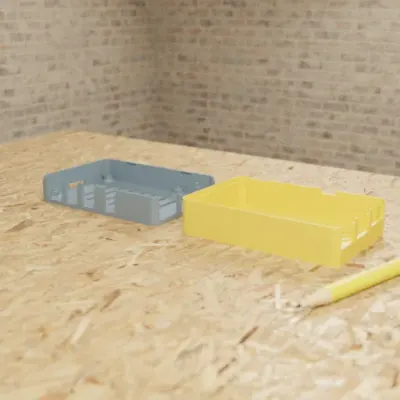
  • Raspberry Pi 4 Snap-Fit Case

    • Part
    • Fits a Raspberry Pi 4
    • 4 sliders
    • 3MF

    Snap-fit enclosure with port cutouts, vents and M2.5 posts; sliders for wall thickness, clearance and standoff height. The preview colours the base and lid apart; the chat sets no filament colours.

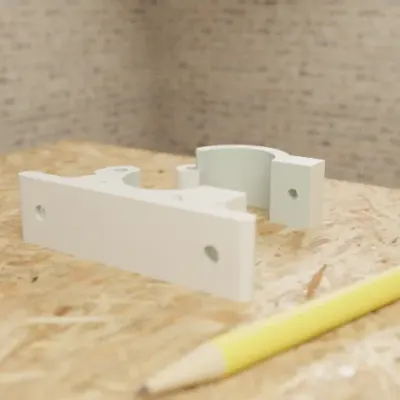
  • Hinged Pipe Wall Bracket

    • Part
    • For a 25 mm pipe
    • 1 colour
    • 7 sliders
    • 3MF

    Two-piece clamp for a 25 mm pipe with an M4 closure; change the pipe diameter and it re-fits; assembled-view toggle.

  • Knurled Potentiometer Knob (6mm D-Shaft)

    • Part
    • 25 mm across, 6 mm D-shaft
    • 1 colour
    • 9 sliders
    • 3MF

    D-shaft bore with a fit_clearance parameter, knurl count and an indicator line; 9 parameters.

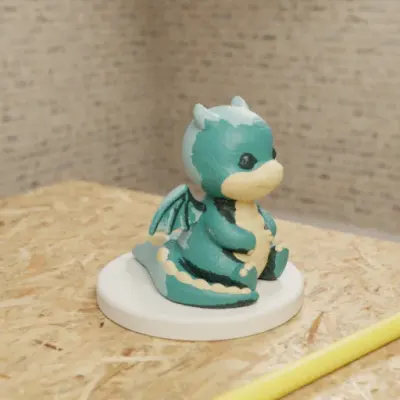
  • Sculpted Dragon Figurine

    • Sculpted
    • 65 mm dragon on a 75 mm base
    • Up to 4 colours
    • 3 sliders
    • 3MF

    Sculpted dragon on a round base, up to 4 colours. Base diameter and base height are real sliders; the height slider resizes the whole dragon, and a different shape is a new generation.

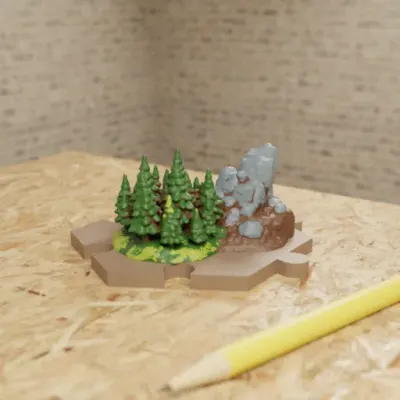
  • Hexagonal Forest Terrain Tile

    • Sculpted
    • 75 mm flat to flat
    • Up to 4 colours
    • 3 sliders
    • 3MF

    Sculpted forest outcrop on a hex tile with interlocking edges and a clearance slider.

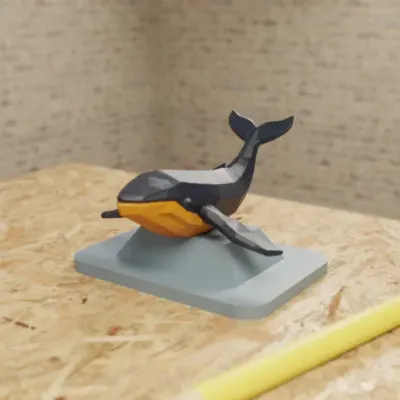
  • Low-Poly Whale Ornament

    • Sculpted
    • 70 x 50 mm stand
    • 2 colour settings
    • 5 sliders
    • 3MF

    2-colour print with colour pickers as parameters.

Real GrandpaCAD outputs from public chats our team published; each picture is that chat's own preview render. Open one to see the model, its sliders and the conversation. Sizes and slider counts read from each chat on 8 Nov 2026.

How it works in a chatOne real GrandpaCAD chat, from the message our team typed to the file, plus the slicing step it now offers: PCB Mounting Bracket with M3 Insert Bosses
  1. You type what you need

    Create a mounting bracket for a 125x80mm PCB with M3 threaded insert bosses in the corners, 4mm standoffs, and two countersunk slots for wall mounting.

  2. It builds the part

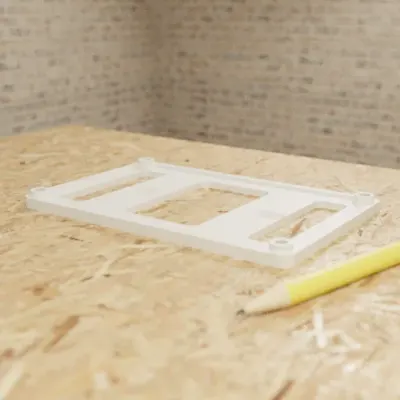
    PCB mounting bracket generated in GrandpaCAD, a flat frame with insert bosses

    At the sizes you typed. The agent renders the model and checks it before you see it.

  3. You change sizes with sliders

    • PCB length125 mmRange 50 to 200 mm.
    • Standoff height4 mmRange 2 to 15 mm.
    • M3 insert hole4.2 mmRange 3.5 to 5 mm.

    11 sliders in this chat. Moving one doesn't use a generation.

  4. You download the file

    3MF for your slicer, or STL, STEP, OBJ, GLB, GLTF. Free accounts get 3 trial generations; downloads need a paid pack or plan.

  5. Or it slices it for your printer

    When you ask, with OrcaSlicer: toolpaths in the viewer, print time and grams per filament, no generation used. How it picks settings

Compare all 20 tools

Exports, exact millimetres, editing, STEP and free files for every ranked tool, with filters. Each mark links to the page it came from.

Every fact and source, tool by tool

Showing 20 of 20 tools

AI CAD and AI 3D tools for 3D printing, ranked by score. Facts checked 8 Nov 2026.
ToolMakesExportsExact mmEdit afterSTEPFree files
Rank 1: GrandpaCADScore 13 / 14Parametric CAD + sculpted meshes3MF STL STEP OBJ GLB GLTFYes. Dimensions in your message land as real millimetres. Source: GrandpaCAD: CAD for 3D printing, checked 2026-11-08Yes. Sliders rebuild CAD parts without a new generation. Sculpted parts need a re-cut. Source: GrandpaCAD pricing and FAQ, checked 2026-11-08Yes. STEP download on a paid pack or plan. Source: GrandpaCAD (STEP export), checked 2026-11-08No. 3 free generations, but downloads need a paid pack or plan. Source: GrandpaCAD pricing and FAQ, checked 2026-11-083 free generations, but downloads need a paid pack or plan.
Rank 2: BuildCAD AIScore 11 / 14Parametric CAD from textSTEP STL 3MFYes. Parametric CAD from your measurements. Source: BuildCAD AI: CAD for 3D printing, checked 2026-11-08Yes. Sliders and click-a-face edits. Source: BuildCAD AI pricing, checked 2026-11-08Yes. STEP export, also on free. Source: BuildCAD AI pricing, checked 2026-11-08Yes. Exports included on the 200-credit free plan. Source: BuildCAD AI pricing, checked 2026-11-08Exports included on the 200-credit free plan.
Rank 3, tied: CADAMScore 10 / 14Open-source text to OpenSCADSTL SCAD DXFYes. OpenSCAD solids in model units. Source: CADAM on GitHub, checked 2026-11-08Yes. Auto-detected sliders. Source: CADAM on GitHub, checked 2026-11-08No. No STEP. Source: CADAM on GitHub, checked 2026-11-08Yes. Free when self-hosted. Source: CADAM on GitHub, checked 2026-11-08Free when self-hosted.
Rank 3, tied: Zoo Design StudioScore 10 / 14Parametric CAD from textSTEP STL glTF/GLB OBJ PLYYes. B-rep solids at modelled dimensions; missing ones get guessed. Source: Zoo FAQ, checked 2026-11-08Yes. Feature tree and KCL code. Source: Zoo FAQ, checked 2026-11-08Yes. STEP export. Source: Zoo Design Studio export docs, checked 2026-11-08Yes. Free plan exports; Zoo trains on free-plan data. Source: Zoo pricing API, checked 2026-11-08Free plan exports; Zoo trains on free-plan data.
Rank 5, tied: AdamScore 8 / 14AI agent inside pro CADSTEPYes. Native CAD features. Source: Adam docs: modeling, checked 2026-11-08Yes. Native feature trees. Source: Adam docs: modeling, checked 2026-11-08Yes. STEP export. Source: Adam docs: modeling, checked 2026-11-08Not listed. Free daily pool; export terms not stated. Source: Adam docs: billing, checked 2026-11-08Free daily pool; export terms not stated.
Rank 5, tied: ModelRiftScore 8 / 14AI OpenSCAD with annotationsSTL SCADYes. OpenSCAD solids. Source: ModelRift pricing, checked 2026-11-08Partly. Edit the code or annotate; no slider panel listed. Source: ModelRift pricing, checked 2026-11-08No. STL and SCAD only. Source: ModelRift pricing, checked 2026-11-08Not listed. 100 sign-up credits; download limits not stated. Source: ModelRift pricing, checked 2026-11-08100 sign-up credits; download limits not stated.
Rank 7: WompScore 7.5 / 14AI base mesh + sculpting editorSTL OBJ glTF PLYNo. Not dimension-driven. Source: Womp pricing, checked 2026-11-08Partly. Sculpt by hand in Womp's editor. Source: Womp blog: drawing or image to 3D print (2026-04-14), checked 2026-11-08No. Mesh formats only. Source: Womp blog: drawing or image to 3D print (2026-04-14), checked 2026-11-08Partly. Free forever with limited exports. Source: Womp pricing, checked 2026-11-08Free forever with limited exports.
Rank 8, tied: Autodesk Fusion + AssistantScore 7 / 14Pro CAD with an AI assistantSTEP STL 3MF OBJPartly. Exact CAD, but the AI does basic features only. Source: makers101: ChatGPT and Fusion 360 (2026-10-10), checked 2026-11-08Yes. Parametric timeline. Source: makers101: ChatGPT and Fusion 360 (2026-10-10), checked 2026-11-08Yes. STEP export, including on personal use. Source: Autodesk: Fusion for personal use (regional autodesk.com page; the main site blocked our fetcher), checked 2026-11-08Partly. Free for personal, non-commercial use. Source: Autodesk: Fusion for personal use (regional autodesk.com page; the main site blocked our fetcher), checked 2026-11-08Free for personal, non-commercial use.
Rank 8, tied: MeshyScore 7 / 14AI mesh generatorSTL 3MF OBJ FBX GLB USDZ BLENDNo. Mesh; default unit cm; resizing needs a paid plan. Source: Meshy docs: 3D printing, checked 2026-11-08No. Mesh only, no parameters. Source: Meshy docs: 3D printing, checked 2026-11-08No. Mesh formats only. Source: Meshy docs: 3D printing, checked 2026-11-08Yes. 10 downloads/month, CC BY 4.0. Source: Meshy pricing, checked 2026-11-0810 downloads/month, CC BY 4.0.
Rank 8, tied: Onshape (AI Advisor, FeatureScript MCP)Score 7 / 14Pro CAD with an AI assistantSTEP STL ParasolidPartly. Exact CAD; AI modelling only through the early-access MCP. Source: Onshape blog: FeatureScript MCP server, checked 2026-11-08Yes. Parametric history. Source: Onshape blog: FeatureScript MCP server, checked 2026-11-08Yes. STEP export. Source: Onshape pricing, checked 2026-11-08Partly. Free, but non-commercial and every document public. Source: Onshape pricing, checked 2026-11-08Free, but non-commercial and every document public.
Rank 11, tied: 3D AI StudioScore 6.5 / 14AI mesh aggregatorSTL 3MF OBJ FBX GLB USDZ BLEND PLYNo. Mesh only. Source: 3D AI Studio, checked 2026-11-08No. Mesh only. Source: 3D AI Studio, checked 2026-11-08No. Mesh formats only. Source: 3D AI Studio, checked 2026-11-08Not listed. Free credit amount not stated. Source: 3D AI Studio pricing, checked 2026-11-08Free credit amount not stated.
Rank 11, tied: ChatGPT, Claude or Gemini + OpenSCADScore 6.5 / 14Do it yourself with a chatbotSTL 3MF OBJPartly. Exact when the code is right; frequent spatial mistakes. Source: Hacker News thread on LLM CAD (May 2026), checked 2026-11-08Partly. Edit variables in code by hand. Source: OpenSCAD, checked 2026-11-08Partly. Only if the chatbot writes CadQuery or build123d. Source: OpenSCAD, checked 2026-11-08Yes. Free tools, free chat tiers. Source: OpenSCAD, checked 2026-11-08Free tools, free chat tiers.
Rank 13, tied: Backflip AIScore 5.5 / 14Scan, drawing or photo to CADSTEPPartly. From a scan, drawing or photo with one known dimension; not from text. Source: Backflip AI, checked 2026-11-08Yes. Feature tree. Source: Backflip AI, checked 2026-11-08Yes. STEP export. Source: engineering.com review (2026-08-04), checked 2026-11-08Not listed. Free plan export limits not stated. Source: Backflip pricing, checked 2026-11-08Free plan export limits not stated.
Rank 13, tied: MakerWorld MakerLabScore 5.5 / 14AI mesh generatorSTL 3MF GLBNo. Mesh only. Source: Meshy blog: MakerWorld image to 3D vs Meshy (posted 2026-10-21), checked 2026-11-08No. Mesh only. Source: Meshy blog: MakerWorld image to 3D vs Meshy (posted 2026-10-21), checked 2026-11-08No. Mesh formats only. Source: Meshy blog: MakerWorld image to 3D vs Meshy (posted 2026-10-21), checked 2026-11-08Partly. 2 free generations per account, never reset. Source: Meshy blog: MakerWorld image to 3D vs Meshy (posted 2026-10-21), checked 2026-11-082 free generations per account, never reset.
Rank 13, tied: SloydScore 5.5 / 14AI mesh generator (game assets)GLB OBJ STL 3MFNo. Mesh generator. Source: Sloyd pricing, checked 2026-11-08Partly. Template customisation only. Source: Sloyd pricing, checked 2026-11-08No. Mesh formats only. Source: Sloyd pricing, checked 2026-11-08Partly. 1 generation a day, personal use; the pricing page says Guest exports are "Community models only". Source: Sloyd pricing, checked 2026-11-081 generation a day, personal use; the pricing page says Guest exports are "Community models only".
Rank 16, tied: Hyper3D RodinScore 5 / 14AI mesh generatorSTL FBX OBJ GLB glTF USDZNo. Mesh only. Source: Hyper3D Rodin, checked 2026-11-08No. Mesh only. Source: Hyper3D Rodin, checked 2026-11-08No. Mesh formats only. Source: Hyper3D Rodin, checked 2026-11-08No. Free plan pays per credit. Source: Hyper3D pricing, checked 2026-11-08Free plan pays per credit.
Rank 16, tied: Tripo AIScore 5 / 14AI mesh generatorSTL 3MF OBJ FBX GLB/glTF USDZ PLYNo. Mesh only. Source: Tripo llms.txt, checked 2026-11-08No. Mesh only. Source: Tripo llms.txt, checked 2026-11-08No. Mesh formats only. Source: Tripo llms.txt, checked 2026-11-08Not listed. Free plan terms unverified on the vendor site. Source: CostBench: Tripo AI pricing (third party, checked by them 2026-11-05), checked 2026-11-08Free plan terms unverified on the vendor site.
Rank 18: Hitem3DScore 3.5 / 14AI mesh generatorNot verifiedNo. Mesh only. Source: Hitem3D pricing, checked 2026-11-08No. Mesh only. Source: Hitem3D pricing, checked 2026-11-08No. Mesh only. Source: Hitem3D pricing, checked 2026-11-08Not listed. Not stated. Source: Hitem3D pricing, checked 2026-11-08Not stated.
Rank 19: Microsoft TRELLIS.2Score 3 / 14Open model (image to 3D)GLBNo. No real-world scale. Source: TRELLIS.2 README, checked 2026-11-08No. Mesh only. Source: TRELLIS.2 README, checked 2026-11-08No. GLB only. Source: TRELLIS.2 README, checked 2026-11-08Yes. Free and MIT. Source: TRELLIS.2 on GitHub, checked 2026-11-08Free and MIT.
Rank 20: Tencent Hunyuan3DScore 2.5 / 14Open weights (2.1) + hosted (3.x)GLB OBJNo. No real-world scale. Source: GitHub API: Hunyuan3D-2.1, checked 2026-11-08No. Mesh only. Source: GitHub API: Hunyuan3D-2.1, checked 2026-11-08No. Mesh only. Source: GitHub API: Hunyuan3D-2.1, checked 2026-11-08Partly. Free weights, but the licence excludes the EU, UK and South Korea. Source: Hunyuan3D 2.1 licence, checked 2026-11-08Free weights, but the licence excludes the EU, UK and South Korea.
Checked but not ranked (10 tools)
  • Spline: Built for interactive web 3D, not printing; STL export needs the Pro plan.
  • Leo AI: Sold as an annual per-user enterprise subscription by quote; not aimed at makers.
  • Shapr3D: No AI model generation; its only AI feature is generative renders.
  • Plasticity: No AI features found.
  • Tinkercad: No built-in AI generation found in any official source.
  • Thangs: A model marketplace; we found no text- or image-to-3D generator.
  • FreeCAD: Classic CAD with no AI generation; covered in our CAD software guide.
  • OpenSCAD: Classic code CAD with no AI of its own; AI routes are under 'ChatGPT, Claude or Gemini + OpenSCAD'.
  • Blender: Mesh modelling software with no built-in AI generation; covered in our CAD software guide.
  • SketchUp: Classic modelling software with no AI model generation; covered in our CAD software guide.

Questions people ask

What is the best AI CAD for 3D printing?

On our criteria it's GrandpaCAD, and we think it's also the easiest: you work in a plain chat, and it builds parts to the millimetres you type with a free slider per dimension, handles threads and fits, sculpts multi-colour figurines, exports 3MF, STL or STEP, and slices for your printer in the chat when you ask. If you're a professional engineer who wants a full CAD modeller with a feature tree, pick Zoo Design Studio. The weights behind the order are on our method page.

Is there a free AI CAD tool for 3D printing?

Some are free to download from, and our free AI CAD page lists each free plan with its source. GrandpaCAD, which we recommend, is free to try rather than free: 3 generations with no card, but downloading files needs a paid pack (from $12) or plan. If you're a professional who needs free exports, Zoo Design Studio's free plan includes unlimited modelling, $10 a month of AI usage and STEP/STL exports, but Zoo trains on free-plan data.

What's the difference between AI CAD and an AI 3D model generator?

AI CAD tools (GrandpaCAD's parametric mode, BuildCAD, Zoo, CADAM) build solids from code or a feature tree, so sizes are exact and editable. AI 3D model generators (Meshy, Tripo, Rodin) make triangle meshes that look right but have no editable dimensions; Meshy's default unit is centimetres. Parts that must fit need CAD; figurines and props are meshes. GrandpaCAD does both in one chat.

Which AI CAD tools export STEP files?

Of the tools we compared: GrandpaCAD, Zoo Design Studio, BuildCAD AI, Backflip AI, Adam, Autodesk Fusion and Onshape. Meshy, Tripo, CADAM and ModelRift don't. For 3D printing our pick is GrandpaCAD: it gives you STEP next to 3MF and STL from the same chat.

Did you print models from every tool?

No. We haven't run or printed the rival tools yet, so this page ranks them on documented facts (exports, free plans, editing, prices), each with a source and a check date. The only first-hand outputs on this site are GrandpaCAD's public example models, which you can open yourself.

Is GrandpaCAD free?

You get 3 free generations with no card, at the same output quality as paid plans, and you can preview and move sliders for free. Downloading STL, 3MF, STEP, OBJ or GLB files needs a credit pack (from $12 for 25 generations) or a subscription ($24 a month for 70).