OpenSCAD with AI: chatbots, MCP and dedicated tools
By the GrandpaCAD team ·
Top 3 of 4 on our 14-point score
- 1GrandpaCADour pick13 of 14
- 2CADAM10 of 14
- 3ModelRift8 of 14
As of November 2026, the OpenSCAD AI we'd use is GrandpaCAD: you describe the part in a chat, it writes OpenSCAD with BOSL2, renders and checks it, and hands back sliders and a 3MF, STL or STEP file, but not the .scad. If you want to write and keep the .scad yourself, the OpenSCAD MCP servers and render-and-look loop below show how.
Try GrandpaCAD free 3 free generations · downloads from $12
This page is for people who already use OpenSCAD or want to: render loops, MCP servers, BOSL2 and tips. If you've never touched it, start with the step-by-step for beginners.
Short answer
GrandpaCAD writes OpenSCAD, renders and checks it, and gives you sliders and STEP, all from a chat.
Zoo Design Studio for professional engineers who want code-based CAD (KCL) with a feature tree around the AI.
YesPartlyNoNot listed
Made by the GrandpaCAD team. We set the criteria and score every tool ourselves, GrandpaCAD included. No sponsors or affiliate links. How we score
Why OpenSCAD suits AI
OpenSCAD describes a part as code: variables, a few primitives (cube, cylinder, sphere) and operations (union, difference, hull). There's no mouse history and no hidden state, so a language model can read and write the whole model as text. Every size is a number you can find and change. And it's free and open source (GPL-2.0), on Windows, macOS and Linux. Source: About OpenSCAD, checked
GrandpaCAD, the tool we make, builds its parametric parts in OpenSCAD too; it's the only CAD engine GrandpaCAD runs live today.
OpenSCAD's own weaknesses: it can't fillet an arbitrary edge the way Fusion can, and it doesn't export STEP. GrandpaCAD lists STEP among its downloads; on the do-it-yourself route, ask the chatbot for CadQuery or build123d instead. More options are in our CAD software for 3D printing guide.
Four routes from a prompt to an OpenSCAD part
- Chatbot and copy-paste. ChatGPT, Claude or Gemini writes the code; you paste it into OpenSCAD, render, and paste errors back. Free, and the most work.
- An assistant with tools. Claude Code, Cursor or an MCP-enabled chat runs OpenSCAD itself, renders PNGs, looks at them and fixes the code. Free apart from the chat plan, and you need to be comfortable installing things.
- A dedicated OpenSCAD AI app. CADAM and ModelRift run OpenSCAD in the browser and add sliders (CADAM) or annotate-to-edit (ModelRift).
- A CAD agent that uses OpenSCAD under the hood. GrandpaCAD writes OpenSCAD with the BOSL2 library, renders the result from several angles, fixes what it finds and gives you a parameter panel. You never have to open the code.
How to make an OpenSCAD part with ChatGPT or Claude
The free route, step by step. You need OpenSCAD installed and any chatbot. The downloads page recommends a nightly build with the Manifold engine switched on, which renders far faster than the 2021.01 stable release. Source: OpenSCAD downloads, checked
Write a spec, not a wish
Every size in millimetres, what the part fits, which face sits on the bed, and how you'll fasten it. Then tell the chatbot how to structure the code. More examples are in our copy-ready AI CAD prompts.
prompt: Write OpenSCAD code for a wall-mounted...Write OpenSCAD code for a wall-mounted holder for a 28 mm diameter flashlight. Back plate 70 x 40 x 4 mm with two countersunk holes for 4 mm screws, 50 mm apart. A C-shaped clip, 20 mm tall, 3 mm wall, 0.4 mm clearance around the flashlight, opening 24 mm wide so it snaps in. Print with the back plate flat on the bed. Put every dimension in a named variable at the top, with Customizer comments like // [min:step:max]. Use only built-in OpenSCAD modules. Reply with the code only.
Preview, then render
Paste into OpenSCAD and press F5 to preview. If it looks right, press F6 to render the real solid; some errors only show up at render time. Copy any console error back to the chatbot word for word.
Use the Customizer as free sliders
Open Window, then Customizer. Variables with range comments become sliders, and
/* [Tab] */comments group them. This is the OpenSCAD equivalent of a parameter panel, and it costs no AI calls. Source: OpenSCAD manual: Customizer, checkedOpenSCAD code/* [Size] */ width = 60; // [20:1:200] depth = 40; // [20:1:200] height = 25; // [5:1:100] wall = 2; // [1.2:0.4:4] /* [Hidden] */ eps = 0.01; $fa = 1; $fs = 0.4; difference() { cube([width, depth, height]); translate([wall, wall, wall]) cube([width - 2 * wall, depth - 2 * wall, height + eps]); }Show it what it built
Take screenshots from the front, side and top and attach them in a multimodal chat with one sentence on what's wrong ("the clip opening faces the wall; it should face away"). Commenters in a Hacker News thread on AI CAD recommend feeding renders back and checking several angles. Source: Hacker News thread on LLM CAD (May 2026), checked
Export 3MF, check in the slicer
File, Export, 3MF (or STL). Slicers read the numbers as millimetres. Read the dimensions the slicer reports and print just the clip ring first if the fit matters.
OpenSCAD AI tips that work
- Ask for an overlap on every cut. Subtracting a shape whose face lines up exactly with the outer face leaves a paper-thin skin or render glitches. Ask the AI to extend cutting shapes by a small
eps(0.01 mm) past each face. - Set the circle resolution. Without it, small holes come out as hexagons and octagons that print tight.
$fa = 1; $fs = 0.4;scales the facet count with the size of each circle; a global$fn = 64also works but wastes facets on tiny holes. - Name the fit, not just the size. "5 mm hole" gets you a hole that's tight after printing. "5 mm hole with 0.2 mm clearance, as a variable" gets you one you can tune.
- Ask for modules. "Make the clip a module called
clip(d)" makes later changes local, so a fix to the clip doesn't rewrite the base. - Pin the library. Say "built-ins only" for code that runs anywhere, or "BOSL2, installed" when you need threads, chamfers and attachments; models tend to mix up BOSL2 argument names, so paste errors back as they appear.
- Start from working code. A MakeUseOf writer found from-scratch OpenSCAD "didn't work well" while editing existing models did. Source: MakeUseOf: designing parts with Claude, checked Paste a file that renders and ask for one change at a time.
- Keep orientation explicit. "Z is up, the base is at z = 0" saves you from parts that land rotated 90 degrees, a complaint that comes up in the maker threads we read. Source: Hacker News thread on LLM CAD (May 2026), checked
OpenSCAD MCP servers, Claude Code and agents
The copy-paste loop exists because the chatbot can't run OpenSCAD. Give it a way to and most of the loop disappears. As of November 2026 there are three practical ways.
Open-source OpenSCAD MCP servers. RobertCoop/openscad-mcp (MIT) exposes rendering, checking, measuring and exporting (STL, 3MF and more) to Claude Code, Claude Desktop, Cursor, Windsurf and VS Code. jhacksman/OpenSCAD-MCP-Server (MIT) turns SCAD into an STL plus four PNG previews. Both need OpenSCAD installed on your machine. Source: openscad-mcp (RobertCoop) on GitHub, checked Source: OpenSCAD-MCP-Server (jhacksman) on GitHub, checked We haven't run either; check the README for setup and what your client supports.
A coding agent with a terminal. Claude Code, Cursor and similar agents can call the OpenSCAD command line directly: openscad -o part.png part.scad renders a preview image and openscad -o part.3mf part.scad exports. Tell the agent to render after every change and look at the PNG before it answers.
You're writing OpenSCAD in part.scad. After every change:
1. Run: openscad -o part.png --imgsize=800,600 --autocenter --viewall part.scad
2. Look at part.png and check it against the spec before replying.
3. If OpenSCAD prints a warning or error, fix it first.
When it's right, export with: openscad -o part.3mf part.scad
A modelling service behind MCP. GrandpaCAD has its own MCP server at grandpacad.com/mcp, so ChatGPT, Claude, Claude Code, Cursor and VS Code can ask it for a model; it does the OpenSCAD, the rendering and the checks on its side and returns the model with its parameters. Free accounts get 3 generations; downloading files needs a paid pack or plan. Setup steps are on GrandpaCAD's ChatGPT and Claude page.
Dedicated OpenSCAD AI tools compared
The DIY route and the three tools that run OpenSCAD for you, on the facts that matter for printing.
Show the four routes side by side: exports, editing, free tier, price, limits
| What | ChatGPT, Claude or Gemini + OpenSCAD | CADAM | ModelRift | GrandpaCAD |
|---|---|---|---|---|
| Exports | OpenSCAD exports STL, 3MF and more; CadQuery and build123d also export STEP.Src: OpenSCAD, checked | STL, SCAD and DXF. No 3MF, no STEP.Src: CADAM on GitHub, checked | STL plus the OpenSCAD code.Src: ModelRift pricing, checked | 3MF, STL, STEP, OBJ, GLB and GLTF downloads on a paid pack or plan.Src: GrandpaCAD (STEP export), checked |
| Editing afterwards | You own the code; parameters are variables you edit by hand.Src: OpenSCAD, checked | Auto-detected parameter sliders; moving one updates the SCAD without an LLM call.Src: CADAM on GitHub, checked | OpenSCAD code and annotate-to-edit; no slider panel listed.Src: ModelRift pricing, checked | Every dimension you mention can become a slider; moving it rebuilds the part and doesn't use a generation. Sculpted shapes don't follow sliders: a new shape or palette is a new generation; a height slider only scales the whole model.Src: GrandpaCAD pricing and FAQ, checked |
| Free tier | Free chat tiers plus free OpenSCAD.Src: OpenSCAD, checked | Self-hosting is free (GPL-3.0). The hosted version at adam.new/cadam runs on Adam's plans.Src: CADAM on GitHub, checked | 100 sign-up credits ($2.00).Src: ModelRift pricing, checked | 3 trial generations, no card, same output quality as paid. No downloads on the free account.Src: GrandpaCAD pricing and FAQ, checked |
| Paid from | Optional chat plan, for example Claude Pro $20/month ($17/month billed annually) or Google AI Pro EUR 21.99/month (EU listing).Src: Claude pricing, checked | Hosted: on Adam's plans, prices unverified. One HN user (June 2026): "$20 for 2k credits won't last long".Src: Launch HN: Adam, checked | Pay as you go, about $0.02 per credit: a simple request is about 0.5 credits, a complex session about 50. Purchased credits expire after 2 months.Src: ModelRift pricing, checked | $12 one-off for 25 generations (valid 1 year); $24/month for 70; $228/year for 840. Prices exclude tax.Src: GrandpaCAD pricing and FAQ, checked |
| Limits | You run the loop yourself. "LLMs are still very weak at spatial reasoning" (HN, May 2026).Src: Hacker News thread on LLM CAD (May 2026), checked | OpenSCAD only (no STEP); no 3MF or colour. HN users report spatial-reasoning errors, such as wrong pin pitch from a datasheet.Src: Launch HN: Adam, checked | STL is the only mesh format mentioned; we found few independent reviews.Src: ModelRift pricing, checked | No IGES or Parasolid export, no feature tree or constraints. No stress simulation, and it slices only on request. Complex assemblies take follow-up turns. Downloads need a paid pack or plan.Src: GrandpaCAD 2.0, checked |
When Zoo is the better pick
If you're a professional engineer who likes CAD as code, Zoo Design Studio's models are KCL code behind a feature tree, which you can read and edit, with an AI agent that builds them. Source: Zoo FAQ, checked GrandpaCAD has no feature tree and doesn't hand you the .scad; if you want to keep the code yourself, the do-it-yourself route and the MCP servers above are free and keep it on your machine.
Parametric parts built by GrandpaCAD
Raspberry Pi 4 Snap-Fit Case
- Part
- Fits a Raspberry Pi 4
- 4 sliders
- 3MF
Snap-fit enclosure with port cutouts, vents and M2.5 posts; sliders for wall thickness, clearance and standoff height. The preview colours the base and lid apart; the chat sets no filament colours.
Knurled Potentiometer Knob (6mm D-Shaft)
- Part
- 25 mm across, 6 mm D-shaft
- 1 colour
- 9 sliders
- 3MF
D-shaft bore with a fit_clearance parameter, knurl count and an indicator line; 9 parameters.
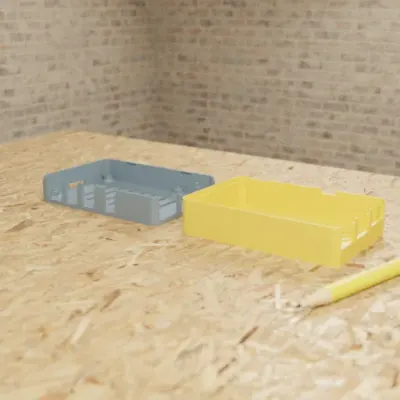
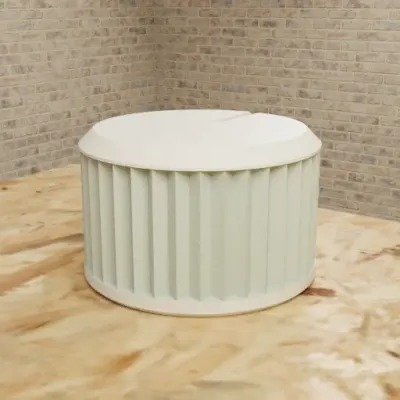
Real GrandpaCAD outputs from public chats our team published; each picture is that chat's own preview render. Open one to see the model, its sliders and the conversation. Sizes and slider counts read from each chat on 8 Nov 2026.
Questions people ask
Can ChatGPT write OpenSCAD code?
Yes. ChatGPT, Claude and Gemini all write OpenSCAD, and it works well for boxes, brackets, spacers and other dimensioned parts. Expect a few rounds of fixes for hinges, snap fits or anything where parts have to line up in 3D, because the model can't see what it built unless you show it.
Which AI is best at OpenSCAD?
We haven't run a controlled comparison of ChatGPT, Claude and Gemini on OpenSCAD, so we won't name one. What matters more than the model is the loop: a model that can render the code and look at the result beats a better model writing blind.
Is there an OpenSCAD MCP server?
Yes, several open-source ones on GitHub, such as RobertCoop/openscad-mcp and jhacksman/OpenSCAD-MCP-Server. They let Claude Desktop, Claude Code, Cursor and other MCP clients render OpenSCAD to images and export STL or 3MF, so the assistant can check its own work. You still need OpenSCAD installed locally.
Is there a free AI OpenSCAD generator?
GrandpaCAD, the one we recommend, runs OpenSCAD for you with 3 free generations, but downloads need a paid pack (from $12) or plan. CADAM is open source (GPL-3.0) and free to self-host; it generates OpenSCAD with auto-detected sliders. A free chatbot plan plus OpenSCAD (also free) costs nothing if you do the rendering yourself.
Can AI use BOSL2 in OpenSCAD?
Yes, if the library is installed where your OpenSCAD can find it, and if you say so in the prompt. Chatbots tend to mix up BOSL2 function names and arguments, so paste the error back word for word. If you want code that runs anywhere, ask for built-in modules only.
Can OpenSCAD export 3MF?
Yes, OpenSCAD's user manual lists 3MF among its export formats, next to STL and OBJ. Prefer 3MF: it stores units and can hold several parts in one file.