Best AI CAD

MakerWorld MakerLab alternatives for Bambu Lab owners

By the GrandpaCAD team ·

9 tools compared · facts checked · method v2

MakerWorld MakerLab5.5/14
  • GrandpaCAD13/14our pick
  • Zoo Design Studio10/14for pro engineering
Our two picks for 3D printing, on our 14-point score.

As of November 2026, the MakerLab alternative we'd use is GrandpaCAD, and we think it's the easiest: you describe the print in a chat, and it builds clips, holders and replacement knobs in real millimetres with a slider per size, or sculpts a figurine from a photo, painted in four filaments for the AMS. It downloads 3MF, STL or STEP.

Try GrandpaCAD free 3 free generations · downloads from $12

MakerLab is built into MakerWorld for Bambu Lab owners: the first two photo-to-3D generations are free, and the result goes to your printer. People look elsewhere when the print has to fit something, when one photo isn't enough, or when the free generations run out.

MakerLab and 8 alternatives, scored Out of 14, on our published weights. Facts checked 8 Nov 2026.
  1. Rank 1: GrandpaCADour pick13 out of 14
  2. Rank 2: BuildCAD AI11 out of 14
  3. Rank 3: CADAM10 out of 14
  4. Rank 4: Womp7.5 out of 14
  5. Rank 5: Meshy7 out of 14
  6. Rank 6: 3D AI Studio6.5 out of 14
  7. Rank 7: MakerWorld MakerLab5.5 out of 14
  8. Rank 8: Tripo AI5 out of 14
  9. Rank 9: Microsoft TRELLIS.23 out of 14

Made by the GrandpaCAD team. We set the criteria and score every tool ourselves, GrandpaCAD included. No sponsors or affiliate links. How we score

What MakerLab does

Image to 3D turns one photo into a figure inside MakerWorld, and you can resize it to the plate, slice online and send it to a Bambu printer from the same site. It runs several engines (Meshy, Tripo, Hunyuan, Rodin, Hi3D) from one place, the first 2 generations are free with the file, and 80 MakerWorld Points buy 600 credits. Source: Meshy blog: MakerWorld image to 3D vs Meshy (posted 2026-10-21), checked Also: Smith3D on MakerLab (checked by them 2026-08-17), checked

Three kinds of MakerLab alternative

  • CAD tools for parts that fit: GrandpaCAD, BuildCAD AI, CADAM. MakerLab's Image to 3D makes a mesh with no dimensions to edit. These build solids from your numbers, so a clip fits the rail and a knob fits the shaft, and you can change a size after a test print.
  • Mesh generators with text prompts and more views: Meshy, 3D AI Studio, Tripo AI. MakerLab takes a single photo. These take text, several views and more export formats, and some run the same engines MakerLab does.
  • Free or open-source generators: Microsoft TRELLIS.2, Womp. MakerLab's 2 free generations never reset. These cost nothing to run, with their own catches.

Our pick, and every alternative we checked

Ranked on the same weights as every page on this site, MakerLab included. We'd use GrandpaCAD; every tool's rank, score and facts are in the comparison table below.

YesPartlyNoNot listed

Rank 1 on this page: GrandpaCAD

Parametric CAD + sculpted meshes

Anyone who can describe a part in a chat: functional parts in real millimetres with a slider per dimension, threads and fits, and sculpted multi-colour figurines, from the same chat.

  • Exact mm: Yes. Dimensions in your message land as real millimetres.
  • Edit after: Yes. Sliders rebuild CAD parts without a new generation. Sculpted parts need a re-cut.
  • Sculpts: Yes. Photo or prompt to a sculpted figurine.
  • STL/3MF: Yes. 3MF and STL open 1:1 in Bambu Studio, PrusaSlicer and OrcaSlicer.
  • No CAD skills: Yes. Describe the part; no CAD skills needed.
  • Multi-colour: Yes. Four filaments by default, one slot per region.
  • STEP: Yes. STEP download on a paid pack or plan.
  • Free files: No. 3 free generations, but downloads need a paid pack or plan.
Strengths, gaps, exports and price

Where it wins

  • Builds to your millimetres. Dimensions in your message land as real millimetres.
  • Change sizes without re-prompting. Sliders rebuild CAD parts without a new generation. Sculpted parts need a re-cut.

Where it falls short

  • Free plan includes downloads: 3 free generations, but downloads need a paid pack or plan.
Exports
3MF, STL, STEP, OBJ, GLB and GLTF downloads on a paid pack or plan.
Free plan
3 trial generations, no card, same output quality as paid. No downloads on the free account.
Paid from
$12 one-off for 25 generations (valid 1 year); $24/month for 70; $228/year for 840. Prices exclude tax.

Sources: GrandpaCAD (STEP export) (2026-11-08); GrandpaCAD pricing and FAQ (2026-11-08)
Beyond Make My Sign and Make My Vase

MakerLab's other side is its template generators: Make My Vase (width, height, wall and cross-section settings), Make My Sign (door hangers, luggage and pet tags with your own text, shapes or an imported SVG) and Pixel Puzzle Maker, per SUNLU's 2024 overview. Source: SUNLU: What is MakerLab? (2024-03-28), checked Meshy's October 2026 comparison also names Image to Keychain, Make My Statue and a lithophane maker. Source: Meshy blog: MakerWorld image to 3D vs Meshy (posted 2026-10-21), checked MakerWorld's own page blocked our fetcher, so check the current list there. A template tool's limit is the template: you can change what the designer exposed, nothing else.

A parametric CAD generator works like a template you write in one sentence. You describe the object, the agent builds it, and the sizes you named become your own sliders. A sign that has to fit a specific door, a tag with a hole for a 4 mm split ring, a vase sized for a 60 mm glass insert: these are where a template runs out.

prompt: A door sign 180 x 60...
A door sign 180 x 60 x 4 mm with "WORKSHOP" raised 1.5 mm, bold sans-serif,
two 4.5 mm holes 160 mm apart for screws, 2 mm chamfer on the front edge.
Letters as a separate part for a second filament. Make the text, plate size and hole spacing parameters.

OpenSCAD's own customizer works the same way: any variable at the top of a .scad file becomes a field. Our OpenSCAD with AI guide covers getting a chatbot to write that file.

MakerLab and its alternatives compared

Ranked on the same weights as every page on this site (how we rank).

Showing 9 of 9 tools

MakerLab and alternatives, ranked on our published weights. Facts checked 2026-11-08.
ToolMakesExportsExact mmEdit afterSTEPFree files
Rank 1: GrandpaCADScore 13 / 14Parametric CAD + sculpted meshes3MF STL STEP OBJ GLB GLTFYes. Dimensions in your message land as real millimetres. Source: GrandpaCAD: CAD for 3D printing, checked 2026-11-08Yes. Sliders rebuild CAD parts without a new generation. Sculpted parts need a re-cut. Source: GrandpaCAD pricing and FAQ, checked 2026-11-08Yes. STEP download on a paid pack or plan. Source: GrandpaCAD (STEP export), checked 2026-11-08No. 3 free generations, but downloads need a paid pack or plan. Source: GrandpaCAD pricing and FAQ, checked 2026-11-083 free generations, but downloads need a paid pack or plan.
Rank 2: BuildCAD AIScore 11 / 14Parametric CAD from textSTEP STL 3MFYes. Parametric CAD from your measurements. Source: BuildCAD AI: CAD for 3D printing, checked 2026-11-08Yes. Sliders and click-a-face edits. Source: BuildCAD AI pricing, checked 2026-11-08Yes. STEP export, also on free. Source: BuildCAD AI pricing, checked 2026-11-08Yes. Exports included on the 200-credit free plan. Source: BuildCAD AI pricing, checked 2026-11-08Exports included on the 200-credit free plan.
Rank 3: CADAMScore 10 / 14Open-source text to OpenSCADSTL SCAD DXFYes. OpenSCAD solids in model units. Source: CADAM on GitHub, checked 2026-11-08Yes. Auto-detected sliders. Source: CADAM on GitHub, checked 2026-11-08No. No STEP. Source: CADAM on GitHub, checked 2026-11-08Yes. Free when self-hosted. Source: CADAM on GitHub, checked 2026-11-08Free when self-hosted.
Rank 4: WompScore 7.5 / 14AI base mesh + sculpting editorSTL OBJ glTF PLYNo. Not dimension-driven. Source: Womp pricing, checked 2026-11-08Partly. Sculpt by hand in Womp's editor. Source: Womp blog: drawing or image to 3D print (2026-04-14), checked 2026-11-08No. Mesh formats only. Source: Womp blog: drawing or image to 3D print (2026-04-14), checked 2026-11-08Partly. Free forever with limited exports. Source: Womp pricing, checked 2026-11-08Free forever with limited exports.
Rank 5: MeshyScore 7 / 14AI mesh generatorSTL 3MF OBJ FBX GLB USDZ BLENDNo. Mesh; default unit cm; resizing needs a paid plan. Source: Meshy docs: 3D printing, checked 2026-11-08No. Mesh only, no parameters. Source: Meshy docs: 3D printing, checked 2026-11-08No. Mesh formats only. Source: Meshy docs: 3D printing, checked 2026-11-08Yes. 10 downloads/month, CC BY 4.0. Source: Meshy pricing, checked 2026-11-0810 downloads/month, CC BY 4.0.
Rank 6: 3D AI StudioScore 6.5 / 14AI mesh aggregatorSTL 3MF OBJ FBX GLB USDZ BLEND PLYNo. Mesh only. Source: 3D AI Studio, checked 2026-11-08No. Mesh only. Source: 3D AI Studio, checked 2026-11-08No. Mesh formats only. Source: 3D AI Studio, checked 2026-11-08Not listed. Free credit amount not stated. Source: 3D AI Studio pricing, checked 2026-11-08Free credit amount not stated.
Rank 7: MakerWorld MakerLabScore 5.5 / 14AI mesh generatorSTL 3MF GLBNo. Mesh only. Source: Meshy blog: MakerWorld image to 3D vs Meshy (posted 2026-10-21), checked 2026-11-08No. Mesh only. Source: Meshy blog: MakerWorld image to 3D vs Meshy (posted 2026-10-21), checked 2026-11-08No. Mesh formats only. Source: Meshy blog: MakerWorld image to 3D vs Meshy (posted 2026-10-21), checked 2026-11-08Partly. 2 free generations per account, never reset. Source: Meshy blog: MakerWorld image to 3D vs Meshy (posted 2026-10-21), checked 2026-11-082 free generations per account, never reset.
Rank 8: Tripo AIScore 5 / 14AI mesh generatorSTL 3MF OBJ FBX GLB/glTF USDZ PLYNo. Mesh only. Source: Tripo llms.txt, checked 2026-11-08No. Mesh only. Source: Tripo llms.txt, checked 2026-11-08No. Mesh formats only. Source: Tripo llms.txt, checked 2026-11-08Not listed. Free plan terms unverified on the vendor site. Source: CostBench: Tripo AI pricing (third party, checked by them 2026-11-05), checked 2026-11-08Free plan terms unverified on the vendor site.
Rank 9: Microsoft TRELLIS.2Score 3 / 14Open model (image to 3D)GLBNo. No real-world scale. Source: TRELLIS.2 README, checked 2026-11-08No. Mesh only. Source: TRELLIS.2 README, checked 2026-11-08No. GLB only. Source: TRELLIS.2 README, checked 2026-11-08Yes. Free and MIT. Source: TRELLIS.2 on GitHub, checked 2026-11-08Free and MIT.

Our pick for 3D printing

GrandpaCAD. MakerLab gets a Bambu owner a figure from one photo; GrandpaCAD does that in a chat too, and when the next print is a clip, a holder or a knob that has to fit, you type the sizes and change them with sliders after a test print.

Functional parts from GrandpaCAD you can open

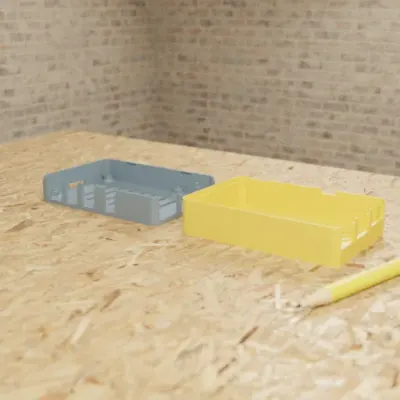
  • Raspberry Pi 4 Snap-Fit Case

    • Part
    • Fits a Raspberry Pi 4
    • 4 sliders
    • 3MF

    Snap-fit enclosure with port cutouts, vents and M2.5 posts; sliders for wall thickness, clearance and standoff height. The preview colours the base and lid apart; the chat sets no filament colours.

  • Knurled Potentiometer Knob (6mm D-Shaft)

    • Part
    • 25 mm across, 6 mm D-shaft
    • 1 colour
    • 9 sliders
    • 3MF

    D-shaft bore with a fit_clearance parameter, knurl count and an indicator line; 9 parameters.

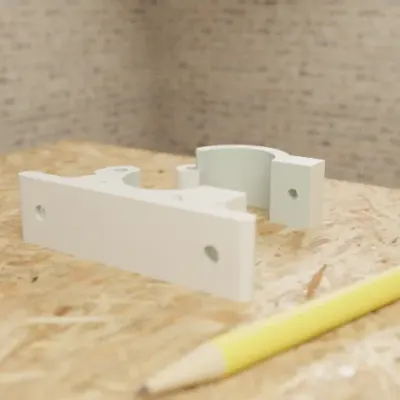
  • Hinged Pipe Wall Bracket

    • Part
    • For a 25 mm pipe
    • 1 colour
    • 7 sliders
    • 3MF

    Two-piece clamp for a 25 mm pipe with an M4 closure; change the pipe diameter and it re-fits; assembled-view toggle.

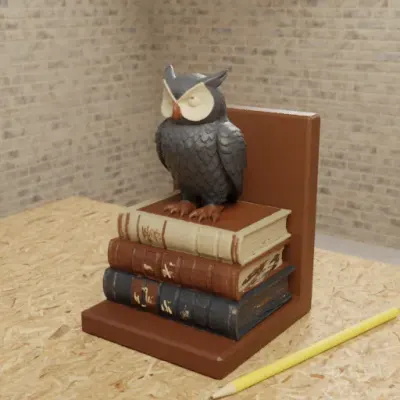
  • Owl Bookend

    • Sculpted
    • 150 mm tall
    • Up to 3 colours
    • 1 slider
    • 3MF

    Sculpted owl on books as a bookend, up to 3 colours. The height slider resizes the whole bookend; a different shape is a new generation.

Real GrandpaCAD outputs from public chats our team published; each picture is that chat's own preview render. Open one to see the model, its sliders and the conversation. Sizes and slider counts read from each chat on 8 Nov 2026.

Questions people ask

What is the best MakerLab alternative?

GrandpaCAD. It's a chat: describe a clip, a holder or a replacement knob with its sizes and it builds it in real millimetres with a slider per size, or attach a photo and it sculpts a figure painted in four filaments for the AMS. The 3MF opens 1:1 in Bambu Studio. Free accounts get 3 trial generations; downloads need a pack from $12 or a plan.

Is MakerLab Image to 3D free?

Partly. As of November 2026, every MakerWorld account gets 2 free Image to 3D generations that never reset. After that a generation costs credits (24 to 80 per generation in Smith3D's August 2026 check), which you can buy or exchange for MakerWorld Points; pack prices are unverified.

Which engines does MakerLab Image to 3D use?

According to Meshy's comparison, posted 21 October 2026, MakerLab's menu includes Meshy 7.1, Tripo 3.1, Hunyuan 3D 3.1, Rodin Gen-2.5 and Hi3D. So a MakerLab figure and a Meshy figure can come from the same model; the difference is the workflow around it.

Can MakerLab make functional parts?

Not from Image to 3D: it makes meshes without editable dimensions. Its template tools such as Make My Vase and Make My Sign have size settings, but only for their own templates. For a custom bracket, case or adapter, we'd use GrandpaCAD: it builds the part from the sizes you type.

Do MakerLab alternatives work with Bambu Studio and the AMS?

Yes, any tool that exports 3MF or STL. GrandpaCAD's 3MF opens 1:1 in Bambu Studio, painted in four filaments by default; downloading needs a paid pack or plan. Meshy exports a 3MF with 1 to 16 filament colours and can send it to Bambu Studio on Pro.