AI CAD prompts for functional prints, ready to copy
By the GrandpaCAD team ·
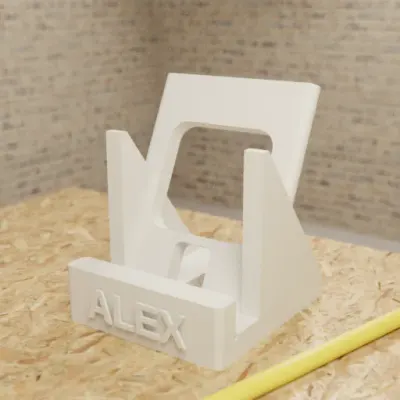
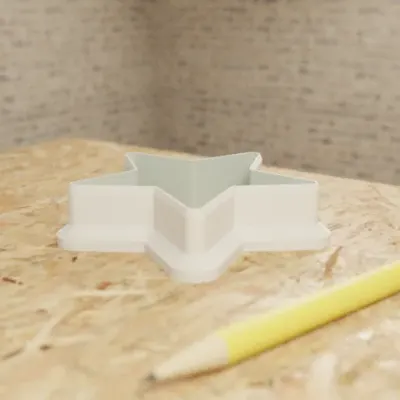
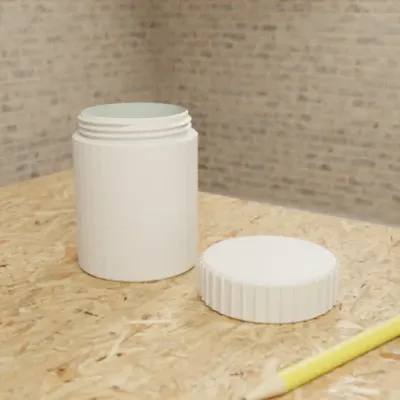
25 prompts for things makers print every week, each with the dimensions, holes and clearances a CAD tool needs. They aren't tied to one tool. Copy one, change the numbers to match your part, and paste it in.
Prompts we sent to GrandpaCAD, and what came back
Three real messages from public chats, each next to the part it built. They follow the rules below: a named object, every size in millimetres, holes by screw size. The prompts further down are new ones we wrote for you to adapt.
The message we sent
prompt: PCB Mounting Bracket with M3 Insert BossesCreate a mounting bracket for a 125x80mm PCB with M3 threaded insert bosses in the corners, 4mm standoffs, and two countersunk slots for wall mounting.
What GrandpaCAD built
The message we sent
prompt: Knurled Potentiometer Knob (6mm D-Shaft)A knurled control knob for a 6mm D-shaft potentiometer, 25mm diameter, with a position indicator line.
What GrandpaCAD built
The message we sent
prompt: Hinged Pipe Wall BracketA hinged wall-mount bracket for a 25mm diameter pipe: two-piece clamp with an M4 screw closure and two wall screw holes. Single color.
What GrandpaCAD built
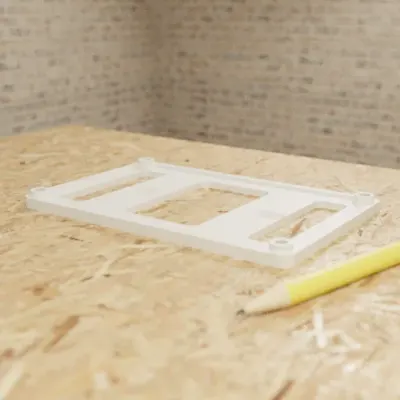
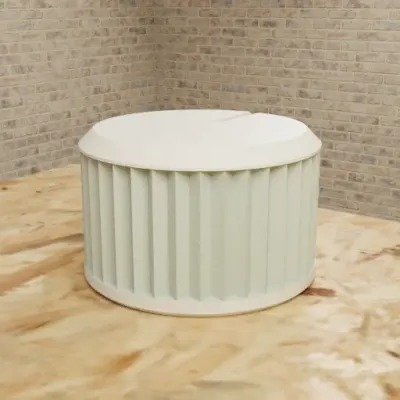
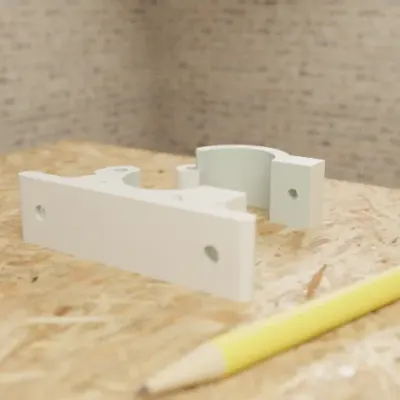
Each message is the first one our team sent when it created the public chat, from our generation log; each picture is that chat's own preview render, read on 2026-11-08.
Made by the GrandpaCAD team. We set the criteria and score every tool ourselves, GrandpaCAD included. No sponsors or affiliate links. How we score
How to write a CAD prompt
Name the object and what it fits. "A clip for a 22 mm pipe" tells the tool more than "a pipe clip".
Give every dimension in millimetres, and say what it measures. Inside or outside, diameter or radius, total height or height above the base.
Name holes by the screw they take. "For an M3 screw" or "for a 4 mm wood screw, countersunk", plus where each hole sits.
State the fit. How much clearance between parts that slide or snap together, per side.
Say which face sits on the bed if it matters for strength or overhangs.
Ask for the numbers you'll change to stay adjustable. In tools that support it, that turns the next fix into a slider or a number instead of a new prompt.
One part per prompt. Ask for the lid after the box is right.
Brackets and stands
Say how thick each leg is, where the holes go and which screws they take. Hole sizes by screw name are easier for you and for the tool than bare diameters.
Shelf L-bracket
An L-bracket for a wooden shelf. Both legs 60 mm long, 25 mm wide and 4 mm thick, with a triangular gusset 15 mm deep in the inside corner. Two countersunk holes for 4 mm wood screws in each leg, 15 mm and 45 mm from the corner, centred across the width. It will print lying on its side, so keep the gusset flat on that face. Let me change leg length, width and thickness afterwards.
Pipe clip
A wall clip for a 22 mm copper pipe. A C-shaped clip with an inside diameter of 22.4 mm and 3 mm walls, open at the front with an 18 mm gap so it snaps over the pipe. The clip's centre sits 20 mm off the wall on a 40 × 20 × 5 mm base with one countersunk hole for a 4 mm screw. Let me change the pipe diameter afterwards.
2020 extrusion corner bracket
A 90° corner bracket for 2020 aluminium extrusion. Two legs 40 mm long, 20 mm wide and 5 mm thick, joined by a triangular gusset. One 5.3 mm hole in each leg, 20 mm from the corner, for an M5 bolt into a T-nut. Under each leg, a rib 6 mm wide and 1.5 mm tall running along the leg so it keys into the extrusion slot.
Phone stand
A desk stand for a phone in a case up to 12 mm thick. Back rest 80 mm wide and 100 mm tall, leaning back 25° from vertical. A front lip 10 mm tall with a 14 mm gap between the lip and the back rest, and a 15 mm wide notch in the middle of the lip for the charging cable. Base 80 × 90 mm, 4 mm thick. Round every outside edge 2 mm.
Enclosures
Give the board size, the tallest component and the screw spacing, then say how the lid closes. Clearance around the board matters more than the wall thickness.
Box for a circuit board
A two-part enclosure for a circuit board 70 × 50 mm and 20 mm tall including components. 2 mm walls and floor, with 1 mm of clearance around the board on every side. Four standoffs 5 mm tall and 6 mm across, with 2.5 mm holes for M3 self-tapping screws, 3.5 mm in from each corner of the board. A lid with a 1.5 mm lip that fits inside the walls with 0.2 mm clearance per side. A 12 × 7 mm cut-out for a USB-C plug centred on one short side, its bottom edge 6 mm above the floor.
Raspberry Pi 4 case
A case for a Raspberry Pi 4 Model B: board 85 × 56 mm, M2.5 mounting holes on a 58 × 49 mm rectangle. 2 mm walls, 2 mm of clearance around the board, the board raised 4 mm on standoffs. Openings 1 mm larger than each port for USB-C, both micro-HDMI and the audio jack on one long side, and the USB and Ethernet ports on the short side. A lid with 2 mm wide vent slots over the processor. Let me change the clearance and the standoff height afterwards.
Sensor box with a wall tab
A small box for an ESP32 dev board 52 × 28 mm. Inside 56 × 32 × 18 mm, 1.6 mm walls. A grid of 2 mm holes on the front face for air, a 6 mm hole on one end for a cable, and a sliding lid in 1.2 mm grooves. One tab on the back, 15 mm tall, with a 4 mm screw hole so it can hang on a wall.
Organisers
Measure the thing that goes in, add clearance, and give the spacing between pockets. Say the pocket shape: round, square or hexagonal.
Pen caddy
A desk caddy with six round pen holes, 12 mm across and 60 mm deep, in a 2 × 3 grid with 18 mm between centres, and one 40 × 20 mm slot beside them for scissors. Outer walls 2.4 mm, floor 3 mm. Round the top edges 1.5 mm.
Hex bit holder
A holder for 1/4-inch hex screwdriver bits. 20 hexagonal pockets, 6.6 mm across the flats and 12 mm deep, in two rows of 10 with 10 mm between centres. Block 110 × 30 × 15 mm. Chamfer the top of each pocket 0.5 mm so the bits drop in easily.
SD card holder
One block that holds 10 full-size SD cards and 10 microSD cards upright. SD slots 2.6 mm wide, 25 mm long and 15 mm deep; microSD slots 1.4 mm wide, 12 mm long and 8 mm deep; 4 mm of material between slots. 3 mm floor, edges rounded 1 mm.
Drawer dividers
Crossing dividers for a drawer 300 mm wide, 220 mm deep and 70 mm tall inside. Strips 2 mm thick and 65 mm tall. Long strips get slots 2.3 mm wide and half the strip height deep every 75 mm; short strips get matching slots from the other edge, so they slot together like an egg crate. Each strip prints flat. Let me change the drawer size and the spacing afterwards.
Replacement parts
Measure the broken part with calipers and give every number, including the ones you think are obvious. Ask to change the fit afterwards, because the first print is usually a test.
Knob for a D-shaft
A replacement knob for a 6 mm D-shaft with one flat, 4.5 mm across the flat, 12 mm of shaft showing. Knob 30 mm across and 18 mm tall, with 24 grip ridges around the edge and a pointer line on top. Shaft hole 6.2 mm with the flat at 4.6 mm, 11 mm deep. Let me change the hole size afterwards.
Chair leg cap
A cap for a round chair leg 22 mm across. Inside 22.3 mm and 15 mm deep, 2 mm walls, 3 mm floor, with a 1 mm chamfer on the outside bottom edge. Let me change the inside diameter afterwards so I can print a tight and a loose one.
Remote battery cover
A sliding battery cover for a remote control. Plate 45 mm long, 22 mm wide and 1.6 mm thick, with a rail 1 mm wide and 1 mm tall along each long edge on the underside. A latch tab 4 mm wide at one end that sticks up 1 mm, and five grip ridges 0.4 mm tall across the top near that end.
Spur gear
A spur gear, module 1, 30 teeth, 20° pressure angle, 8 mm face width, with a 5 mm bore. A hub 12 mm across and 6 mm tall on one side, with a 2.5 mm hole through the hub for an M3 set screw. Let me change the tooth count and bore afterwards.
Hooks
Hooks break where the arm meets the base, so say what it holds and ask for a fillet there. Mention print orientation if you know it.
Pegboard hook
A hook for a pegboard with 1/4-inch holes on a 1-inch grid. Two pegs 6 mm across, 25.4 mm apart vertically, that bend down behind a 5 mm board. Arm 50 mm long and 8 mm wide, ending in a 10 mm upturned lip. A 3 mm fillet where the arm meets the back plate.
Under-desk headphone hook
A hook that screws under a desk. Mounting plate 60 × 25 × 5 mm with two countersunk holes for 4 mm screws, 40 mm apart. An arm that drops 40 mm and curves into a cradle 30 mm deep with a 4 mm lip, 20 mm wide all the way. Round every edge 2 mm so it doesn't dent the headband.
Adhesive hook
A hook for double-sided foam tape: a flat back plate 50 × 20 × 3 mm, and a hook 25 mm deep with a 10 mm opening, 6 mm thick. A 4 mm fillet where the hook meets the plate. The back plate prints flat on the bed.
Gridfinity-style bins
Gridfinity is an open storage standard built on a 42 mm grid with 7 mm height units. Name it, give the size in units, and say which features you want. Check the result against the published Gridfinity dimensions before printing a drawer's worth.
Plain bin
A Gridfinity bin 2 units wide, 1 unit deep and 6 units tall (42 mm grid, 7 mm height units, so the outside is 83.5 × 41.5 mm). Standard Gridfinity base profile under each cell with 6 × 2 mm magnet pockets, a stacking lip on top, and a scoop along the inside front wall. No dividers.
Divided bin with label tab
A Gridfinity bin 3 × 2 units and 3 units tall with the standard base and stacking lip. Two dividers across the long side making three equal compartments, 1.2 mm thick. A label tab 12 mm wide along the back wall, sloped at 45°.
Baseplate for a drawer
A Gridfinity baseplate 4 × 3 units for a drawer 180 × 140 mm inside. Fill the space left around the grid with a solid border so the plate can't slide, split evenly on both sides. No magnet holes, flat bottom.
Signs and name tags
Give the plate size, the letter height and how far the letters stand up, and say which colour goes where if you have an AMS or another multi-filament setup. For a plain name on a plate, Bambu Studio's own Text Shape tool can also do it without any AI.
Two-colour name sign
A name sign 160 × 50 × 4 mm with rounded corners, the name EMMA in raised letters 2 mm high and 30 mm tall, centred. Base white and letters pink as separate colours in a 3MF for a two-filament print. Two 4 mm holes 8 mm from the top corners for a string. Let me change the name and the letter height afterwards.
Figurine bases
Bases are where measured CAD and sculpted shapes meet. Give the base its numbers and the figure a height, and say which colours go where if you print in several filaments.
Miniature base with a magnet
A round base for a 28 mm-scale miniature: 32 mm across, 4 mm tall, 0.5 mm chamfer on the top edge, and a 6 × 2 mm magnet pocket in the centre of the underside. Cobblestone texture on top, no deeper than 0.8 mm.
Sculpted fox on an oval base
A sitting fox on an oval base. Base 60 × 40 mm and 5 mm thick, fox 70 mm tall from the bottom of the base. Fox orange with a white chest and tail tip, base dark grey, as separate colours for a multi-colour 3MF. Keep the tail touching the body, and nothing thinner than 2 mm.
Name plinth with a socket
A plinth for a figure with a 20 mm round peg. Base 50 mm square and 12 mm tall with a 40 mm square step on top, and a 20.4 mm hole 8 mm deep in the centre. The name MAPLE engraved on the front face, letters 6 mm tall and 0.6 mm deep.
Before you print the result
A good prompt still needs a check. Run the file through our printable checklist: units, walls, overhangs and loose parts take a minute to check and save a failed print.
Questions people ask
Have you tested these prompts?
No. We wrote them the way we'd describe a part to a machinist, with every dimension and fit a tool needs, but we haven't run each one through every tool on this site. Treat the first print as a test, and keep the prompts that ask for adjustable sizes, so you can fix the fit without starting again.
Which tools can I paste these into?
Any text-to-CAD tool that builds to real millimetres. We wrote them for GrandpaCAD: paste one into its chat and every size becomes a slider. They're written for any tool that builds to real millimetres; we haven't run them through other tools. Mesh generators ignore exact sizes; see text to CAD for the difference.
What clearance should I ask for?
It depends on your printer, filament and slicer. Around 0.2 mm per side is a common starting point for a part that slides into another on an FDM printer. Print a small test, then change the clearance in the tool if it lets you edit sizes afterwards.
Why does every prompt use millimetres?
Slicers work in millimetres, and a prompt that mixes units, or leaves them out, is the easiest way to get a part ten times too big. Where a standard is in inches (1/4-inch hex bits, pegboard), the prompt names it and still gives the millimetre size.