GrandpaCAD explained: what it does, what it costs, where it falls short
By the GrandpaCAD team · · Updated
GrandpaCAD is our pick
13/14 #1 of 20
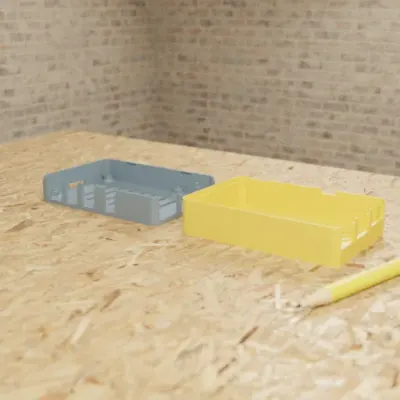
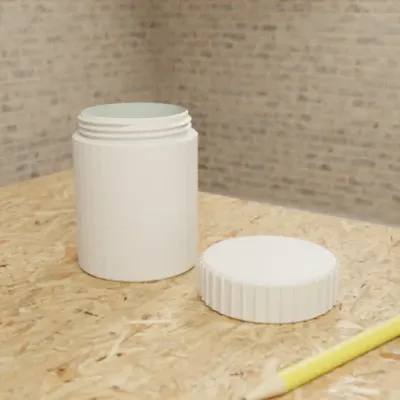
Parts to your millimetres
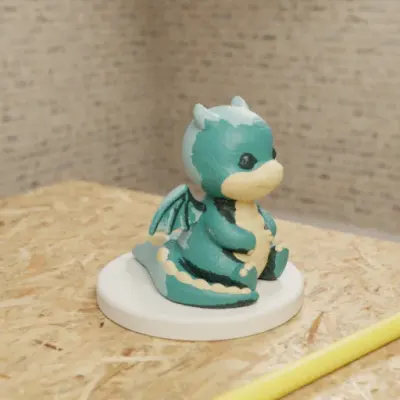
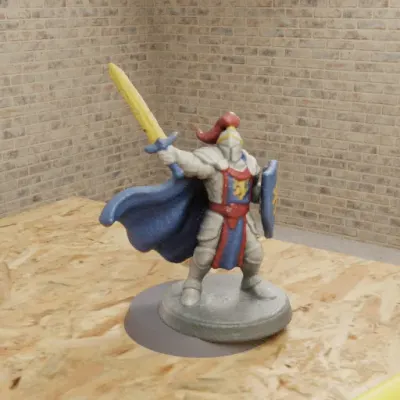
Sculpted figures in colour
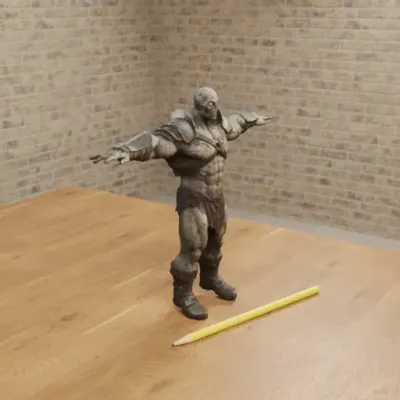
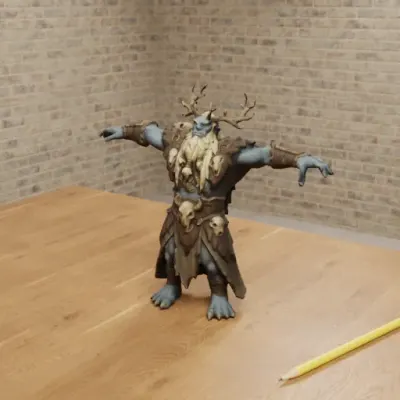
Rigged for games
GrandpaCAD is an AI CAD tool for 3D printing, made by OTIVIA 32, d.o.o. You work in a plain chat: describe a part, or attach a photo, sketch or SVG, and its agent builds the part in OpenSCAD at the millimetres you give, with a slider for each dimension, or sculpts a multi-colour figurine, and hands you a 3MF, STL or STEP file. Free accounts get 3 trial generations; downloads need a paid pack or plan.
We think it's the easiest AI CAD: a plain chat you already know, so anyone can use it. And it still does advanced work: exact millimetres with sliders, threads and fits, multi-colour 3MF and STEP, and it slices for your printer right in the chat.
Try GrandpaCAD free 3 free generations · downloads from $12
Every claim here comes from GrandpaCAD's public pages or from example models you can open; what it doesn't do yet and when Zoo Design Studio is the better pick are below.
You type what you need
A hinged wall-mount bracket for a 25mm diameter pipe: two-piece clamp with an M4 screw closure and two wall screw holes. Single color.
It builds the part
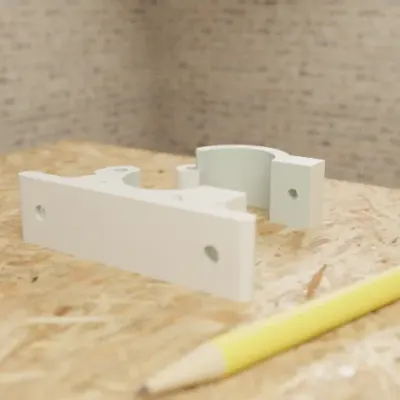
At the sizes you typed. The agent renders the model and checks it before you see it.
You change sizes with sliders
7 sliders in this chat. Moving one doesn't use a generation.
You download the file
3MF for your slicer, or STL, STEP, OBJ, GLB, GLTF. Free accounts get 3 trial generations; downloads need a paid pack or plan.
Or it slices it for your printer
When you ask, with OrcaSlicer: toolpaths in the viewer, print time and grams per filament, no generation used.
Made by the GrandpaCAD team. We set the criteria and score every tool ourselves, GrandpaCAD included. No sponsors or affiliate links. How we score
What GrandpaCAD does for makers
Easy to start. It's a chat, the interface everyone already knows. You describe what you want in plain words, in English, French or Slovenian, and there's no sketching, constraining or extruding to learn first.
Parts that fit. Type the part with its real numbers and they land in the model as millimetres; for named boards, screws and products the agent looks up the real dimensions on the web before it builds. Parts are built in OpenSCAD, and every dimension you mention can become a slider that doesn't use a generation. The Raspberry Pi 4 snap-fit case at the top has sliders for wall thickness, clearance and standoff height, the screw-top jar beside it has thread pitch and thread clearance, the pipe bracket above is a two-piece clamp, and the knurled knob below has a fit clearance for its 6 mm D-shaft. Files download as 3MF, STL or STEP. STEP: GrandpaCAD (STEP export), checked
Figurines and terrain. Sculpted models come out as one solid body, painted in four filaments by default with one slot per region (you can ask for up to ten), and the 3MF opens 1:1 in Bambu Studio, PrusaSlicer and OrcaSlicer. One chat handles a measured part and a sculpted figure and can fuse them into one file, such as a dragon on an exactly sized base. Sculpted shapes don't follow sliders: a new shape or palette is a new generation; a height slider only scales the whole model.
Any starting point. A description, a photo, a sketch or an SVG. You can also attach your own STL, 3MF, OBJ or GLB to repair it, resize it, add a base or cut it in two; editing uploaded meshes is early access.
It checks its work. Before it hands a model over, the agent renders it from several angles, looks at the images and fixes what it finds. If an answer would change the part, it asks a short multiple-choice question first.
Sliced for your printer. Ask, and it slices the finished model for your printer and nozzle with the settings picked for that model, and shows the toolpaths in the chat. How the slicing works.
Inside your AI assistant. Through its MCP server it works in ChatGPT, Claude, Claude Code, Cursor and VS Code, with the same plans as the website.
Source: GrandpaCAD 2.0, checked Also: GrandpaCAD: CAD for 3D printing, checked Also: GrandpaCAD in ChatGPT and Claude, checked
Every GrandpaCAD fact we use on this site, with its source
GrandpaCAD at a glance
- Approach
- An agent writes OpenSCAD for parametric parts and runs a sculpting engine for organic shapes; both can be fused into one file.Source: GrandpaCAD 2.0, checked
- Input
- Text, photos, sketches, SVG, and your own STL, 3MF, OBJ or GLB (mesh editing is labelled early access).Source: GrandpaCAD 2.0, checked
- Exports
- 3MF, STL, STEP, OBJ, GLB and GLTF downloads on a paid pack or plan.Source: GrandpaCAD (STEP export), checked
- Edit after
- Every dimension you mention can become a slider; moving it rebuilds the part and doesn't use a generation. Sculpted shapes don't follow sliders: a new shape or palette is a new generation; a height slider only scales the whole model.Source: GrandpaCAD pricing and FAQ, checked
- Runs in
- Web; also inside ChatGPT, Claude, Claude Code, Cursor and VS Code through its MCP server.Source: GrandpaCAD in ChatGPT and Claude, checked
- Free plan
- 3 trial generations, no card, same output quality as paid. No downloads on the free account.Source: GrandpaCAD pricing and FAQ, checked
- Paid from
- $12 one-off for 25 generations (valid 1 year); $24/month for 70; $228/year for 840. Prices exclude tax.Source: GrandpaCAD pricing and FAQ, checked
- Commercial use
- You own the models you generate and can use them commercially.Source: GrandpaCAD terms, checked
- Printing
- Built in millimetres; 3MF and STL load 1:1 in Bambu Studio, PrusaSlicer and OrcaSlicer. The agent renders the model from several angles and fixes what it sees before handing it over.Source: GrandpaCAD: CAD for 3D printing, checked
- Multi-colour
- 3MF comes painted in four filaments by default, one slot per region; ask for more colours or exact hex values.Source: GrandpaCAD 2.0, checked
- Limits
- No IGES or Parasolid export, no feature tree or constraints. No stress simulation, and it slices only on request. Complex assemblies take follow-up turns. Downloads need a paid pack or plan.Source: GrandpaCAD 2.0, checked
Slicing in the chat, with the settings picked for you
Ask GrandpaCAD to slice a finished model and its agent runs OrcaSlicer 2.4.2 for your printer and nozzle, from a catalog of 372 printers by 60 brands. The toolpaths show up in the chat's viewer, right in your browser, with no slicer to install. You get a .gcode.3mf for a Bambu Lab printer and a .gcode file for the rest. The slicing itself runs on GrandpaCAD's servers and costs no generation; downloading the G-code needs a paid pack or plan, like every other file.
It slices only when you ask: once a model for printing is done, the agent offers once. Before the first slice it asks which spools are loaded and whether your printer has an AMS, MMU, CFS or tool changer. Then it picks the settings for that model and tells you what it chose. The result reports the print time, grams per filament, how much of the print is support, and any slicer warnings, which the agent explains in plain words. The choices you might want to flip, such as supports, infill and layer height, become controls in the chat's parameter panel, and changing one slices again.
| When the model is | The usual pick |
|---|---|
| Figurines and organic overhangs: arms, wings, tails | Tree supports |
| Flat mechanical overhangs | Normal supports, from the plate only when every overhang sits over the bed |
| A small footprint, or a tall thin part, in ABS, ASA or PETG | A 5 mm brim |
| Functional parts | 3–4 walls, 25–40 % gyroid or cubic infill |
| Figurines and decor | 2–3 walls, 10–15 % lightning or gyroid infill |
| A visible flat top | Ironing |
| Parts that mate | Elephant-foot and hole compensation |
| Detail | 0.12–0.16 mm layers for detailed figurines, 0.2 mm standard, 0.28 mm for big drafts |
| A PLA part and a second spool | PETG interface layers under the supports, or a dedicated support filament |
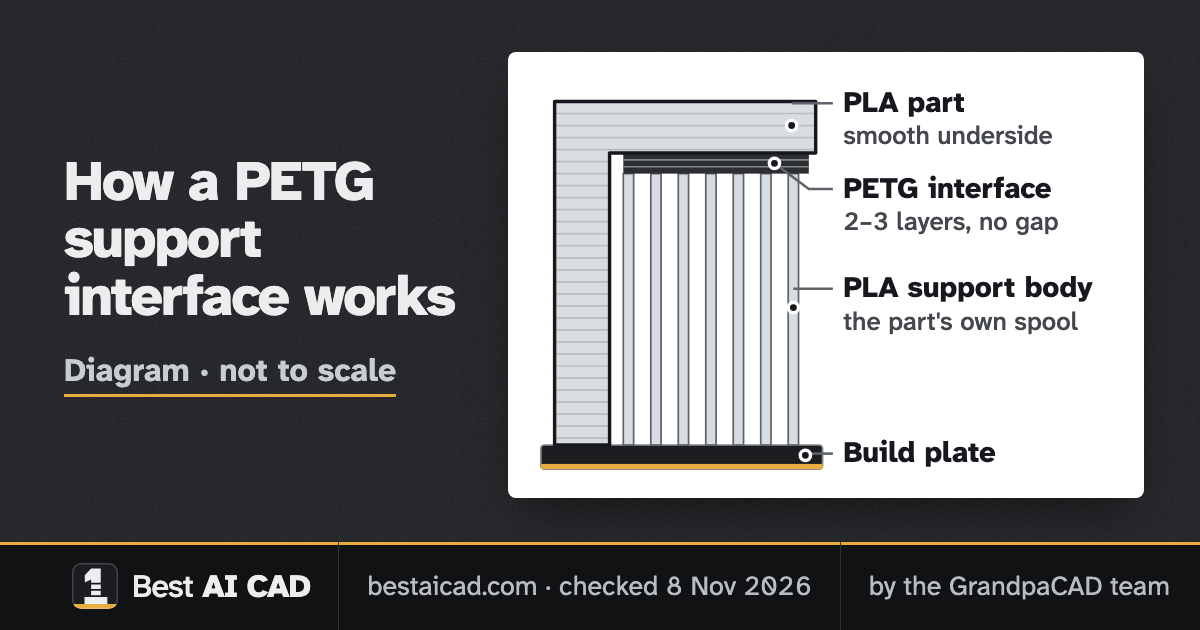
PETG interface layers under PLA supports
With a second spool loaded, the agent can print just the support's contact layers in another filament: PETG under a PLA part, or PLA under a PETG part. PLA and PETG barely bond, so those 2 or 3 layers can touch the part with no gap. The underside comes out smooth, close to a normal printed surface, and the supports snap off by hand. It takes two common spools instead of a dedicated support filament or a soluble one.
PLA and PETG barely bond, so the PETG layers can touch the part with no gap and still snap off by hand. The rest of the support stays in the part's own filament.
In OrcaSlicer terms: the support interface filament goes on the extra slot, the top Z distance is 0 and there are 2 or 3 top interface layers, while the bulk of the support stays in the part's filament. OrcaSlicer refuses PLA and PETG in one print ("the temperature difference of the filaments used is too large") unless mixed temperatures are allowed. GrandpaCAD allows that only for an interface slot, never for two materials in the part itself. A dedicated support filament works as well.
The trade-offs:
- It needs a printer that prints two filaments: an AMS, MMU, CFS or tool changer.
- Every interface layer means filament swaps, which add print time and purge waste in the prime tower.
- Use it for supports only, never for the part: the two materials don't bond.
GrandpaCAD models you can open
Knurled Potentiometer Knob (6mm D-Shaft)
- Part
- 25 mm across, 6 mm D-shaft
- 1 colour
- 9 sliders
- 3MF
D-shaft bore with a fit_clearance parameter, knurl count and an indicator line; 9 parameters.
PCB Mounting Bracket with M3 Insert Bosses
- Part
- 125 x 80 mm board
- 1 colour
- 11 sliders
- 3MF
Wall bracket for a 125 x 80 mm PCB from one sentence; 11 parameters including insert hole size and countersink.
Barbed Hose Adapter 32mm to 19mm
- Part
- 32 mm to 19 mm bore
- 1 colour
- 6 sliders
- 3MF
Both hose diameters, barb count and wall thickness as parameters.
Vertical Speaker Tower Enclosure
- Part
- 210 mm tall, 3-inch driver
- 1 colour
- 8 sliders
- 3MF
3-inch driver cutout, bass-reflex port and tilt angle; 8 parameters.
Majestic Dragon on a Rock
- Sculpted
- Up to 4 colours
- 3MF
Spread-wing dragon in up to 4 colours with black claws and horns.
Owl Bookend
- Sculpted
- 150 mm tall
- Up to 3 colours
- 1 slider
- 3MF
Sculpted owl on books as a bookend, up to 3 colours. The height slider resizes the whole bookend; a different shape is a new generation.
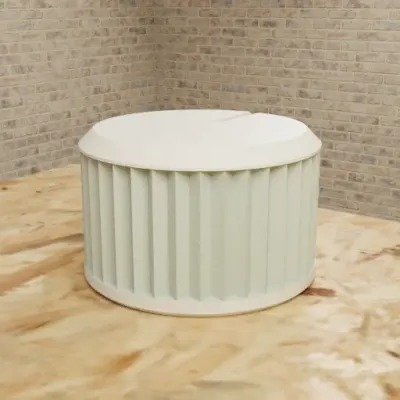
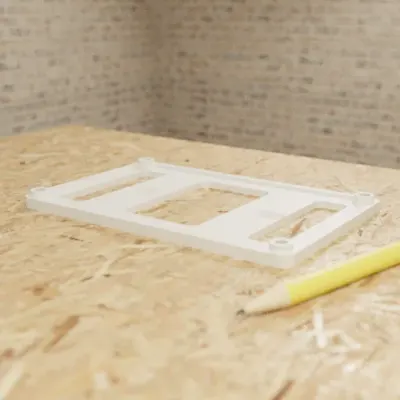
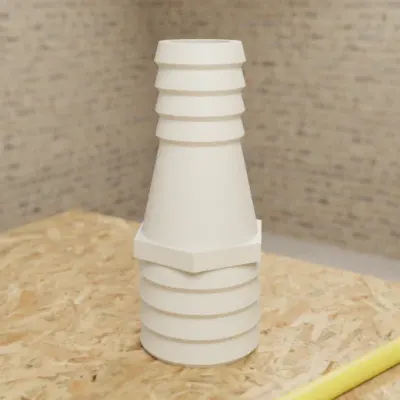
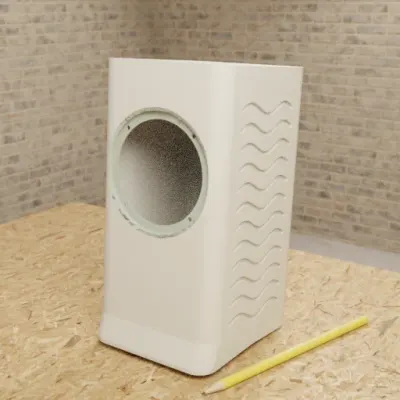
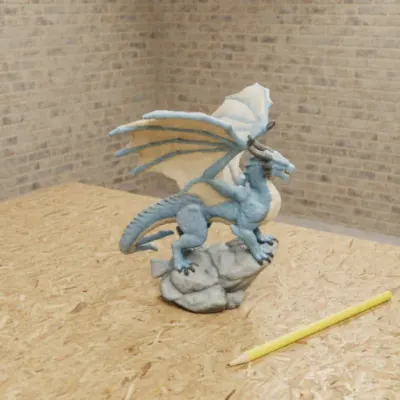
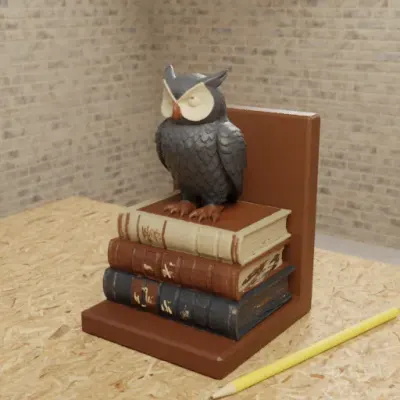
Real GrandpaCAD outputs from public chats our team published; each picture is that chat's own preview render. Open one to see the model, its sliders and the conversation. Sizes and slider counts read from each chat on 8 Nov 2026.
GrandpaCAD pricing (November 2026)
Free accounts get 3 trial generations; downloads need a paid pack or plan. Prices in USD, excluding tax. Moving a slider doesn't use a generation. A purchase also unlocks downloads of models you built before paying.
| Plan | Price | Generations | Terms |
|---|---|---|---|
| Free | $0 | 3 trial generations | No card. Preview and sliders work; no downloads. |
| Starter Pack | $12 | 25 generations | One-off, valid 1 year |
| Plus Pack | $22 | 55 generations | One-off, valid 1 year |
| Pro Pack | $45 | 125 generations | One-off, valid 1 year |
| Monthly Subscription | $24 a month | 70 generations a month | Billed monthly |
| Yearly Subscription | $228 a year | 840 generations a year | Billed yearly |
- What counts: one generation is one finished model. Moving a slider or slicing doesn't count; rigging, each animation and each re-cut of a sculpted model does.
- Files: a paid account downloads STL, 3MF, STEP, OBJ, GLB or GLTF, and the G-code of a slice. Subscriptions can be cancelled at the end of the billing cycle.
Source: GrandpaCAD pricing and FAQ, checked
Try GrandpaCAD free 3 free generations · downloads from $12
What GrandpaCAD doesn't do yet
- No feature tree or constraints, and no IGES or Parasolid export. You change a part with sliders and follow-up messages, not with a feature history you edit in SOLIDWORKS.
- One parametric engine: OpenSCAD.
- It doesn't run stress or load simulation.
- Slicing runs only when you ask, for printers in OrcaSlicer's catalog, and the agent sets a fixed list of OrcaSlicer options; everything else stays at the printer's profile. A very dense mesh can time out and needs a lighter rebuild first.
- Complex assemblies aren't one-shot. The first build is a draft you refine with follow-ups and sliders, and a photo or sketch of a part usually needs two or three turns of nudging dimensions.
- The file is only as accurate as the dimension you typed or the drawing you attached.
- Rigging and animation are alpha: generic bone names, no finger or face rigs, GLB only.
- GrandpaCAD's own terms say AI output may not be geometrically accurate, watertight or printable. Check anything load-bearing or safety-related before you rely on it.
- The free tier is small: 3 generations and no downloads.
- ChatGPT isn't in the plugin directory yet; you connect it by hand in developer mode.
Source: GrandpaCAD 2.0, checked Also: GrandpaCAD terms, checked
How GrandpaCAD compares
Three tools come up most often next to it. The full order is in our ranking and the weights on the method page.
YesPartlyNoNot listed
| GrandpaCADour pick13 / 14 | Criterion | Zoo Design Studiofor pro engineering10 / 14 |
|---|---|---|
| Exact mm×3 | ||
| Edit after×2 | ||
| Sculpts×2 | ||
| STL/3MF×2 | ||
| No CAD skills×2 | ||
| Multi-colour×1 | ||
| STEP×1 | ||
| Free files×1 |
GrandpaCAD vs Zoo Design Studio
Zoo is a full parametric CAD modeller with an AI agent, a feature tree, sketches and readable KCL code, exporting STEP, STL, glTF/GLB, OBJ and PLY but no 3MF, with $10 a month of AI usage and exports on a free plan that trains on your data: pick Zoo if you're a professional engineer who needs that feature tree GrandpaCAD doesn't have yet, and GrandpaCAD for everything a maker prints, from slicer-ready files and sliders to sculpted parts in several filament colours. More on Zoo Text-to-CAD alternatives.
Source: Zoo Design Studio export docs, checked Also: Zoo pricing API, checked Also: Zoo FAQ, checked
GrandpaCAD vs BuildCAD AI
BuildCAD AI builds parametric parts with sliders and click-a-face edits and exports STEP, STL and 3MF, even on its free plan of 200 AI credits (paid from $12 a month, kernel not disclosed); we'd still pick GrandpaCAD, because it also sculpts figurines and paints multi-colour 3MF in the same chat, which BuildCAD doesn't list.
Source: BuildCAD AI pricing, checked
GrandpaCAD vs Meshy
Meshy turns text or a photo into a textured mesh (STL, 3MF with up to 16 filament colours, OBJ, FBX, GLB, USDZ or BLEND, 10 free downloads a month under CC BY 4.0) with no editable dimensions; GrandpaCAD sculpts figurines too, and anything that has to fit, like a figurine on an exactly sized base, gets real millimetres and sliders. More on Meshy alternatives.
Source: Meshy help: multi-colour prints, checked Also: Meshy pricing, checked
Sources for GrandpaCAD facts
Every GrandpaCAD fact on this site comes from one of these grandpacad.com pages. Other pages cite this list instead of linking to grandpacad.com each time.
- GrandpaCAD pricing and FAQ, checked
- GrandpaCAD: CAD for 3D printing, checked
- GrandpaCAD 2.0, checked
- GrandpaCAD: image to 3D model, checked
- GrandpaCAD in ChatGPT and Claude, checked
- GrandpaCAD: SVG to STL, checked
- GrandpaCAD terms, checked
- GrandpaCAD (STEP export), checked
Questions people ask
Is GrandpaCAD free?
Partly. New accounts get 3 free generations with no credit card, at the same quality as paid plans, and previews and sliders cost nothing. Downloading a file needs a credit pack (from $12 for 25 generations) or a subscription ($24 a month for 70). A purchase also unlocks the models you built before paying.
Does GrandpaCAD export STEP?
Yes. STEP downloads alongside 3MF, STL, OBJ, GLB and GLTF on a paid pack or plan. It doesn't export IGES or Parasolid.
Is GrandpaCAD easy to use?
We think it's the easiest AI CAD there is; judge for yourself with the 3 free generations. You work in a plain chat: describe the part, or attach a photo, sketch or SVG, and the agent asks a short multiple-choice question when an answer would change the part. No CAD skills are needed, and it still does advanced work: exact millimetres with a slider per dimension, threads and fits, multi-part prints, multi-colour 3MF, sculpted figurines and STEP export.
Can GrandpaCAD slice my model?
Yes, when you ask. Its agent slices the model with OrcaSlicer 2.4.2 for your printer and nozzle, picks supports, walls, infill and layer height for that model and says what it chose, and the toolpaths show in the chat's viewer with no slicer to install. The slicing runs on GrandpaCAD's servers and costs no generation. Downloading the G-code (.gcode.3mf for Bambu Lab, .gcode for other printers) needs a paid pack or plan, like every other file.
GrandpaCAD vs Zoo: which should I use?
GrandpaCAD for anything a maker prints: you describe the part in a chat, get a slider for each dimension without learning a modeller, and can mix a measured part with a sculpted figure. Zoo Design Studio if you're a professional engineer who wants a full parametric modeller with a feature tree around the AI; its free plan exports without paying, though Zoo trains on free-plan data.
Can I use GrandpaCAD in ChatGPT or Claude?
Yes. Its MCP server at grandpacad.com/mcp works with ChatGPT (in developer mode for now; the directory listing isn't live yet), Claude on the web, desktop and mobile as a custom connector, Claude Code, Cursor and VS Code. You sign in once; the model appears in the conversation in a 3D viewer with its size and parameters, and it also lands in your GrandpaCAD dashboard. Plans and prices are the same as on the website. GrandpaCAD's setup page has the steps.
Who makes GrandpaCAD?
OTIVIA 32, d.o.o. Vito Meznaric started it for his grandfather, who prints on a Bambu Lab A1 and doesn't speak English, which is why the site and the agent's replies are in English, French and Slovenian. The same team writes this site; see about us.