Image to STL: turn a photo, sketch or logo into a printable model
By the GrandpaCAD team ·
11 tools compared · facts checked · method v2
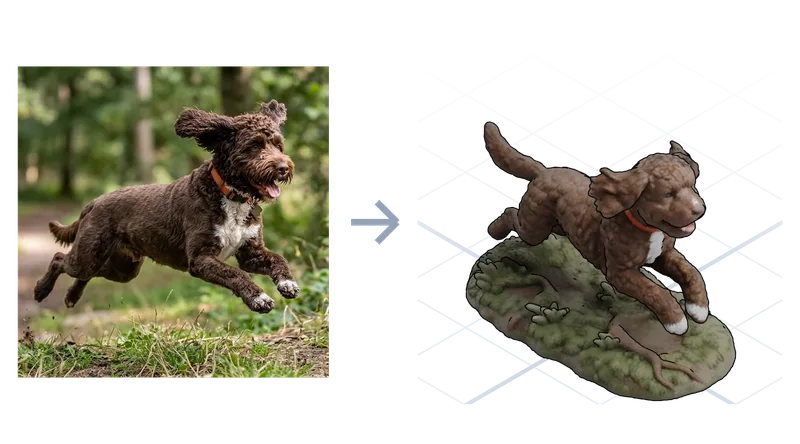
As of November 2026, the AI we'd use to turn an image into a print is GrandpaCAD: attach the picture to a chat and it sculpts a photo into a figurine painted in four filaments, or builds a dimensioned sketch into a measured CAD part with sliders, though you'll usually correct a part over two or three turns. It downloads STL, 3MF or STEP. For professional engineering work in a full CAD modeller, Zoo Design Studio is the better pick.
Try GrandpaCAD free 3 free generations · downloads from $12
"Image to STL" means four jobs, and only two need AI: a lithophane or relief, an extruded logo, a sculpted figure from a photo, and a measured part from a sketch. Pick the job first, then the tool. New to this? Read our beginner's guide to AI for 3D printing.
Short answer
GrandpaCAD for a photo to a multi-colour figurine or a dimensioned sketch to a part with sliders, in one chat. Expect 2 or 3 turns on a part.
Zoo Design Studio for professional engineers who want to rebuild a part in a full CAD app with a feature tree.
- Rank 1: GrandpaCADour pick13 out of 14
- Rank 2: BuildCAD AI11 out of 14
- Rank 3, tied: CADAM10 out of 14
- Rank 3, tied: Zoo Design Studiofor pro engineering10 out of 14
- Rank 5: Meshy7 out of 14
- Rank 6, tied: Backflip AI5.5 out of 14
- Rank 6, tied: MakerWorld MakerLab5.5 out of 14
- Rank 8, tied: Hyper3D Rodin5 out of 14
- Rank 8, tied: Tripo AI5 out of 14
- Rank 10: Hitem3D3.5 out of 14
- Rank 11: Microsoft TRELLIS.23 out of 14
Made by the GrandpaCAD team. We set the criteria and score every tool ourselves, GrandpaCAD included. No sponsors or affiliate links. How we score
Four kinds of image to STL
| You have | You get | Needs AI? | Kind of tool |
|---|---|---|---|
| A photo to light up | A lithophane or flat relief | No | A lithophane generator or your slicer's image import |
| A logo or line art | Extruded outline: sign, keychain, cutter | No, if it's an SVG | Any CAD tool (see logos and line art) |
| A photo of a pet, person or object | A sculpted 3D figure | Yes | An AI that sculpts from a photo. GrandpaCAD does this. |
| A sketch or photo of a part | A measured CAD part | Yes | An AI CAD generator. GrandpaCAD does this; for professional engineering, Zoo Design Studio. |
Our verdict
Pick GrandpaCAD for a photo of a character or animal: it sculpts the figurine and paints the 3MF in four filaments by default, and can put it on an exactly sized base.
Pick GrandpaCAD for a dimensioned sketch of a part: every labelled size becomes a slider you adjust after a test print.
Pick Zoo Design Studio if you're a professional engineer rebuilding a mechanical part in a full CAD workflow.
Lithophanes and reliefs: no AI needed
A lithophane maps each pixel's brightness to a thickness: dark areas get thick plastic, light areas thin, and the picture appears when light shines through. A relief does the same but is meant to be seen in reflected light. Both are flat or curved panels, not 3D figures, and a plain converter does them better than a generative model, because it doesn't invent anything.
- Crop the photo tight and raise the contrast a little. Faces need even light.
- Set the thickness range. A common starting point among makers is 0.8 mm minimum and about 3 mm maximum for a 100 mm panel; that's general guidance, not something we measured, so adjust it to your printer and filament.
- The usual advice is to print it standing up so the layers run across the image, in white or natural PLA, at 100% infill and a fine layer height.
- Add a frame or base in the generator so it stands on its own.
MakerLab has a lithophane maker, according to Meshy's October 2026 comparison (MakerWorld's own page blocked our fetcher), and 3D AI Studio and Hitem3D both list relief tools. Source: Meshy blog: MakerWorld image to 3D vs Meshy (posted 2026-10-21), checked Source: 3D AI Studio, checked Source: Hitem3D pricing, checked GrandpaCAD can also use a photo as a heightmap for a lithophane or raised relief, which helps when the panel has to fit a lamp or frame you've measured.
Logos and line art
A logo isn't a 3D shape to guess at; it's an outline to extrude. Get it as an SVG (or trace a PNG into one), then extrude it in any CAD tool. Text in an SVG has to be converted to paths first, or it disappears.
We don't cover this in depth here, because grandpacad.com has a dedicated SVG to STL page for business cards, keychains, cookie cutters and signs, with colours kept for multi-colour prints. For raised text without a logo, see 3D text and lettering STLs.
Photo to a 3D figure
These generate a full sculpted mesh from one photo (some take several views). None of them gives a sculpted figure editable dimensions; set the size in the slicer. Ranked on the same weights as every page on this site (how we rank).
Showing 7 of 7 tools
No tool matches every filter. Turn one off to see the closest options.
The photo matters more than the tool. Use one clear subject on a plain background, the whole object in frame, even light and no heavy shadows. A three-quarter view shows more of the shape than a straight-on one. MakerLab takes a single image only, so there's no second view to fix a hidden side; if that's your limit, see MakerLab alternatives. Before printing any of them, run the 8-point printability checklist. Source: Meshy blog: MakerWorld image to 3D vs Meshy (posted 2026-10-21), checked
GrandpaCAD's photo-to-figurine flow has its own page with examples: image to 3D model on grandpacad.com. In short, a pet photo becomes a sculpted figurine painted in four filaments by default, and you can ask for it on an exactly sized base.
Sketch or photo to a part with real dimensions
For a bracket, a tray or a replacement part, you want CAD, not a sculpt. These tools read an image and build a measured model.
YesPartlyNoNot listed
Write the sizes on the sketch. Lines aren't measured, so an unlabelled size is a guess. A top view can't show height, so add a side view or put the height in the message.
Build this as a desk tray from the attached sketch. Sizes in mm are written on it.
Height 30 mm, wall 2 mm, floor 1.6 mm, 3 mm fillet on the inside corners.
Make the outer size, height and wall thickness parameters.
When Zoo is the better pick
If you're a professional engineer rebuilding a mechanical part from a sketch or image, Zoo Design Studio's agent takes prompts, images and sketches and builds the part in a full CAD app with a feature tree. Source: Zoo FAQ, checked GrandpaCAD has no feature tree. And for a lithophane, a plain converter is simpler and cheaper than any AI tool, ours included.
Models from GrandpaCAD you can open
Majestic Dragon on a Rock
- Sculpted
- Up to 4 colours
- 3MF
Spread-wing dragon in up to 4 colours with black claws and horns.
Heroic Fantasy Warrior Miniature
- Sculpted
- 50 mm tall
- Up to 4 colours
- 1 slider
- 3MF
Warrior with sword and cape on a round base, up to 4 colours. The height slider resizes the whole miniature; a different pose is a new generation.
Star Cookie Cutter
- Part
- 80 mm across, 15 mm deep
- 1 colour
- 9 sliders
- 3MF
80 mm cutter with a 15 mm edge and rolled rim; star points and blade thickness as sliders.
PCB Mounting Bracket with M3 Insert Bosses
- Part
- 125 x 80 mm board
- 1 colour
- 11 sliders
- 3MF
Wall bracket for a 125 x 80 mm PCB from one sentence; 11 parameters including insert hole size and countersink.
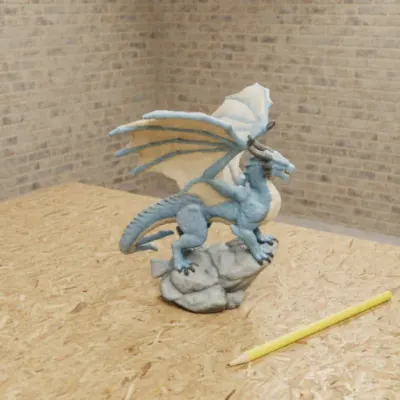
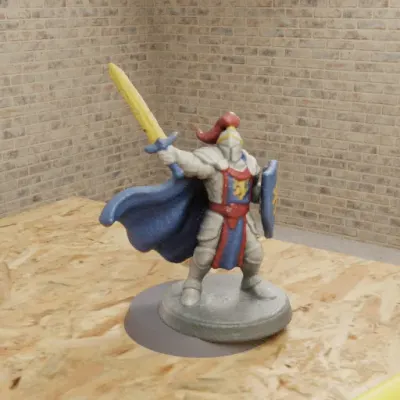
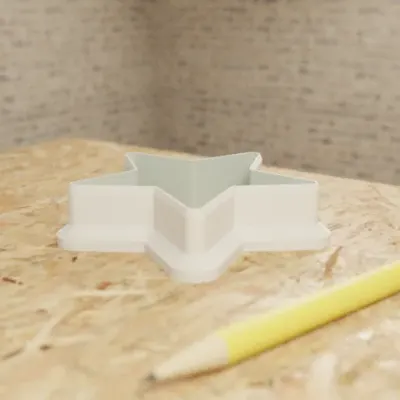
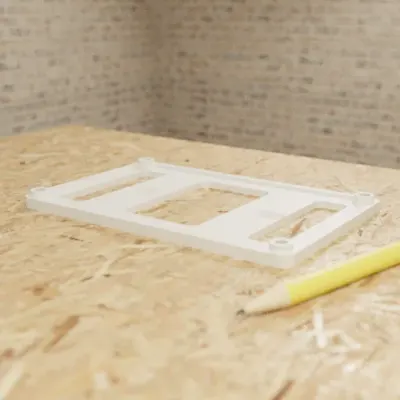
Real GrandpaCAD outputs from public chats our team published; each picture is that chat's own preview render. Open one to see the model, its sliders and the conversation. Sizes and slider counts read from each chat on 8 Nov 2026.
Questions people ask
Can you 3D print from a picture?
Yes, in four ways: as a lithophane or relief (the picture's brightness becomes thickness), as an extruded outline (logos and line art), as a full 3D figure generated by AI, or as a CAD part rebuilt from a sketch or photo with dimensions. Only the last two need AI.
Is there a free image to STL AI?
Some have a free tier. GrandpaCAD, the one we recommend, is free to try but not to download: free accounts get 3 trial generations, and downloads need a paid pack (from $12) or plan. As of November 2026, MakerWorld MakerLab gives 2 free Image to 3D generations per account, Meshy's free plan allows 10 downloads a month (CC BY 4.0), and TRELLIS.2 is free and MIT-licensed if you run it on a 24 GB NVIDIA GPU.
How do I turn a photo into a lithophane STL?
Use a lithophane generator or your slicer's image import: it maps dark pixels to thick plastic and light pixels to thin. A common rule of thumb is about 0.8 mm minimum and 3 mm maximum thickness, printed standing up in white PLA; adjust from there for your printer, then shine a light through it.
Can AI turn a sketch into an STL?
Yes, if you write the sizes on the sketch. GrandpaCAD takes a sketch or photo in the chat and builds a CAD part with a slider per dimension; CADAM, Zoo and BuildCAD also take images. Expect to correct it over two or three turns: callouts get misread and scale gets lost, and a top view can't show height.
Can I make a replacement part from a photo?
From one photo, only roughly. Put a ruler in the shot or give one known dimension, and measure the critical sizes with calipers. Give those numbers to GrandpaCAD with the photo and it builds the part with sliders, as STL, 3MF or STEP, usually after two or three correction turns. For scan-grade accuracy use a 3D scanner.